# 502 Error on Local Site
**URL:** https://community.kinsta.com/t/502-error-on-local-site/2121
**Category:** Application Support
**Created:** [March 6, 2023, 8:04pm UTC](https://community.kinsta.com/t/502-error-on-local-site/2121 "2023-03-06T20:04:46Z")
**Posts on this page:** 20
**Page:** 1
### Author:  [@VIG](https://community.kinsta.com/u/VIG)
#### Post date: [March 6, 2023, 8:04pm UTC](https://community.kinsta.com/t/502-error-on-local-site/2121/1 "2023-03-06T20:04:46Z")
Hi,
I’m having an issue where every time I try to pull from Kinsta to local with DevKinsta, it’s showing a **502 Bad Gateway** error when I try to open the site. I’ve also noticed it’s not showing the screenshot of the site anymore in DevKinsta.
Any suggestions?
---
### Author:  [@VIG](https://community.kinsta.com/u/VIG)
#### Post date: [March 6, 2023, 7:38pm UTC](https://community.kinsta.com/t/502-error-on-local-site/2121/2 "2023-03-06T19:38:30Z")
Hi, I’m having an issue with my site when I pull it to local. It’s giving a **502 Bad Gateway** error.
I’m getting these errors in the log:
2023/03/06 18:31:57 [error] 32#32: \*4 recv() failed (104: Connection reset by peer) while reading response header from upstream, client: 172.172.0.1, server: legaticscom.local, request: “HEAD /?skip\_cache=1 HTTP/1.1”, upstream: “fastcgi://172.172.0.2:9003”, host: “legaticscom.local:57916”
2023/03/06 18:32:01 [error] 32#32: \*8 recv() failed (104: Connection reset by peer) while reading response header from upstream, client: 172.172.0.1, server: legaticscom.local, request: “HEAD /?skip\_cache=1 HTTP/1.1”, upstream: “fastcgi://172.172.0.2:9003”, host: “legaticscom.local:57916”
2023/03/06 18:32:04 [error] 32#32: \*10 recv() failed (104: Connection reset by peer) while reading response header from upstream, client: 172.172.0.1, server: legaticscom.local, request: “HEAD /?skip\_cache=1 HTTP/1.1”, upstream: “fastcgi://172.172.0.2:9003”, host: “legaticscom.local:57916”
2023/03/06 18:32:08 [error] 32#32: \*12 recv() failed (104: Connection reset by peer) while reading response header from upstream, client: 172.172.0.1, server: legaticscom.local, request: “HEAD /?skip\_cache=1 HTTP/1.1”, upstream: “fastcgi://172.172.0.2:9003”, host: “legaticscom.local:57916”
2023/03/06 18:32:11 [error] 32#32: \*14 recv() failed (104: Connection reset by peer) while reading response header from upstream, client: 172.172.0.1, server: legaticscom.local, request: “HEAD /?skip\_cache=1 HTTP/1.1”, upstream: “fastcgi://172.172.0.2:9003”, host: “legaticscom.local:57916”
2023/03/06 18:38:13 [error] 32#32: \*22 recv() failed (104: Connection reset by peer) while reading response header from upstream, client: 172.172.0.1, server: legaticscom.local, request: “GET / HTTP/2.0”, upstream: “fastcgi://172.172.0.2:9003”, host: “legaticscom.local:57916”
2023/03/06 18:38:13 [error] 32#32: \*22 recv() failed (104: Connection reset by peer) while reading response header from upstream, client: 172.172.0.1, server: legaticscom.local, request: “GET /favicon.ico HTTP/2.0”, upstream: “fastcgi://172.172.0.2:9003”, host: “legaticscom.local:57916”, referrer: “[https://legaticscom.local:57916/](https://legaticscom.local:57916/)”
Any advice?
---
### Author:  [@Alessandro](https://community.kinsta.com/u/Alessandro)
#### Post date: [March 7, 2023, 8:32am UTC](https://community.kinsta.com/t/502-error-on-local-site/2121/3 "2023-03-07T08:32:59Z")
Hello @VIG and welcome to DevKinsta Community!
Can you please close both Docker and DevKinsta entirely, start DevKinsta again and then send me a copy of your main.log file via DM? You can find it by clicking on the question mark icon at the bottom left corner of DevKinsta and then on Reveal log file in File Manager.
We’d like to give a look at it and help you find the culprit.
Regards,
Alessandro
---
### Author:  [@Alessandro](https://community.kinsta.com/u/Alessandro)
#### Post date: [March 7, 2023, 1:56pm UTC](https://community.kinsta.com/t/502-error-on-local-site/2121/4 "2023-03-07T13:56:34Z")
Thank you for sending the file via DM @VIG.
Can you also please share what version of macOS are you using?
Regards,
Alessandro
---
### Author:  [@VIG](https://community.kinsta.com/u/VIG)
#### Post date: [March 7, 2023, 2:04pm UTC](https://community.kinsta.com/t/502-error-on-local-site/2121/5 "2023-03-07T14:04:10Z")
Sure thing!
Mac OS Ventura 13.2.1 with M1 chip.
---
### Author:  [@Alessandro](https://community.kinsta.com/u/Alessandro)
#### Post date: [March 7, 2023, 2:38pm UTC](https://community.kinsta.com/t/502-error-on-local-site/2121/6 "2023-03-07T14:38:33Z")
Thank you! Does your browser load a static file like the license.txt as in [https://legaticscom.local:57916/license.txt](https://legaticscom.local:57916/license.txt)
Regards,
Alessandro
---
### Author:  [@VIG](https://community.kinsta.com/u/VIG)
#### Post date: [March 7, 2023, 2:47pm UTC](https://community.kinsta.com/t/502-error-on-local-site/2121/7 "2023-03-07T14:47:04Z")
Yes, this is loading the license text for me.
---
### Author:  [@Alessandro](https://community.kinsta.com/u/Alessandro)
#### Post date: [March 7, 2023, 3:00pm UTC](https://community.kinsta.com/t/502-error-on-local-site/2121/8 "2023-03-07T15:00:08Z")
Okay great, can you please create a phpinfo.php page inside the root of your site and add this content to it:
```auto
```
Unfortunately, 502 it’s a pretty generic error so we need to do some troubleshooting. Let me know if you are able to see that file when loading [https://legaticscom.local:57916/phpinfo.php](https://legaticscom.local:57916/phpinfo.php)
---
### Author:  [@VIG](https://community.kinsta.com/u/VIG)
#### Post date: [March 7, 2023, 3:07pm UTC](https://community.kinsta.com/t/502-error-on-local-site/2121/9 "2023-03-07T15:07:28Z")
Got that added and it’s loading. What do you need from that page?
---
### Author:  [@Alessandro](https://community.kinsta.com/u/Alessandro)
#### Post date: [March 7, 2023, 3:15pm UTC](https://community.kinsta.com/t/502-error-on-local-site/2121/10 "2023-03-07T15:15:04Z")
Okay great, this means that PHP is working fine generally speaking. Let’s test some commands via WP CLI to see how your site responds, I feel there might be some syntax error somewhere.
Please follow the **first** and the **second** step of [this guide](https://kinsta.com/knowledgebase/devkinsta/wp-cli/).
Do not run the command used in step number 3, but instead use `wp option get home`
Does the terminal return any error or it only returns your site domain?
Regards,
Alessandro
---
### Author:  [@VIG](https://community.kinsta.com/u/VIG)
#### Post date: [March 7, 2023, 3:20pm UTC](https://community.kinsta.com/t/502-error-on-local-site/2121/11 "2023-03-07T15:20:02Z")
After running those 3 commands it returns the site domain.
---
### Author:  [@Alessandro](https://community.kinsta.com/u/Alessandro)
#### Post date: [March 7, 2023, 3:27pm UTC](https://community.kinsta.com/t/502-error-on-local-site/2121/12 "2023-03-07T15:27:12Z")
🤔 does the wp-login.php page load at all? Or does it return 502 too?
---
### Author:  [@VIG](https://community.kinsta.com/u/VIG)
#### Post date: [March 7, 2023, 3:35pm UTC](https://community.kinsta.com/t/502-error-on-local-site/2121/13 "2023-03-07T15:35:09Z")
Login page is a 502 as well.
---
### Author:  [@Alessandro](https://community.kinsta.com/u/Alessandro)
#### Post date: [March 7, 2023, 3:41pm UTC](https://community.kinsta.com/t/502-error-on-local-site/2121/14 "2023-03-07T15:41:40Z")
Can you please run the following WP CLI command and try to access the site?
```auto
wp plugin deactivate --all
```
---
### Author:  [@VIG](https://community.kinsta.com/u/VIG)
#### Post date: [March 7, 2023, 3:50pm UTC](https://community.kinsta.com/t/502-error-on-local-site/2121/15 "2023-03-07T15:50:36Z")
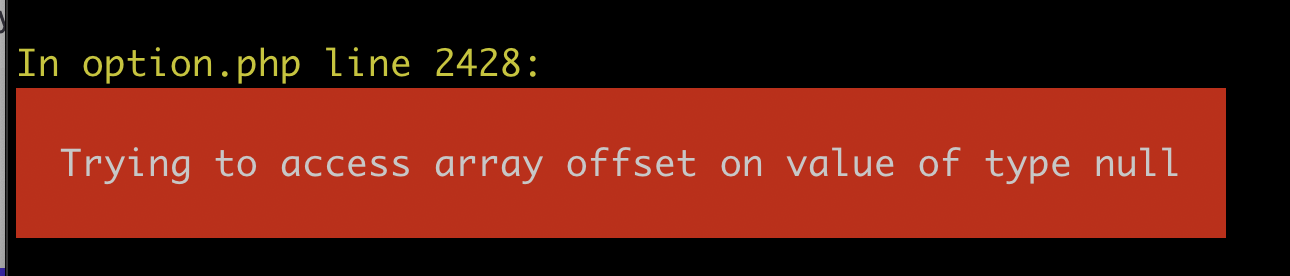
That loaded something different.

Since this theme uses Advanced Custom Fields I’m assuming that’s causing this error.
Also got this in terminal when I ran the command.
---
### Author:  [@Alessandro](https://community.kinsta.com/u/Alessandro)
#### Post date: [March 7, 2023, 3:52pm UTC](https://community.kinsta.com/t/502-error-on-local-site/2121/16 "2023-03-07T15:52:21Z")
Yes looks like your theme requires advanced-custom-fields-pro to be enabled. Let’s try enabling that plugin only before setting a different theme as active if the issue persist:
`wp plugin activate advanced-custom-fields-pro`
---
### Author:  [@VIG](https://community.kinsta.com/u/VIG)
#### Post date: [March 7, 2023, 4:01pm UTC](https://community.kinsta.com/t/502-error-on-local-site/2121/17 "2023-03-07T16:01:00Z")
Okay, after re-activating ACF Pro I’m seeing the 502 again.
---
### Author:  [@VIG](https://community.kinsta.com/u/VIG)
#### Post date: [March 7, 2023, 8:24pm UTC](https://community.kinsta.com/t/502-error-on-local-site/2121/19 "2023-03-07T20:24:01Z")
> [@Alessandro](#):
>
> `wp plugin activate advanced-custom-fields-pro`
It seems to be the theme. When I activate twentytwentytwo theme it comes up. How can we dig into the theme to figure out what’s causing the issue? It was working fine a couple of weeks ago.
---
### Author:  [@Agus](https://community.kinsta.com/u/Agus)
#### Post date: [March 8, 2023, 2:30am UTC](https://community.kinsta.com/t/502-error-on-local-site/2121/20 "2023-03-08T02:30:32Z")
Hello there 🙂
Thank you for your reply and updates!
As I can understand, your “sage” theme requires/uses “Advanced Custom Fields” plugin and, you didn’t get 502 error when you activated “twentytwentytwo” theme because this default WP theme does not use/require that plugin (even after the plugin has been re-activated).
So far we suspect this 502 error actually seems to be from that “Advanced Custom Fields pro” plugin alone (as all other plugins have been deactivated), and this does not seem to be DevKinsta application related issue either.
This plugin does not seem to be a free plugin but a paid/premium/licensed one. Did you buy/purchase it from the plugin’s author/developer perhaps?
If that so, you may want to reach out to that plugin’s support team and see if they know something about it and how to resolve that 502 bad gateway (cause without that plugin re-enabled, you didn’t get 502 error?), as you also previously mentioned:
> Okay, after re-activating ACF Pro I’m seeing the 502 again.
Also, I would check what PHP version is currently used for this local site in DevKinsta?
I’m wondering if it will work fine with different PHP version (still unsure though if this is the case or if there’s something else from that plugin itself).
Let’s say if it’s set with PHP 8.0 or PHP 8.1, may want to try to switch the PHP version for this site to 7.4 (and see if that works?).
From your DevKinsta , click that Site name from the list, then click the _wrench_ icon on the left. After that, on that “Site configurations” page, you can click on the “PHP Version” and click the pencil icon to switch the version, and re-check your site. If it’s still showing 502 error, then I would suggest to reach out to that plugin’s support team for further assistance.
Cheers,
Agus
---
### Author:  [@VIG](https://community.kinsta.com/u/VIG)
#### Post date: [March 8, 2023, 5:15pm UTC](https://community.kinsta.com/t/502-error-on-local-site/2121/21 "2023-03-08T17:15:39Z")
So changing PHP back to 7.4 seems to have fixed it. But why? I had to update to 8 to push back to kinsta and it worked fine before the last update. Also, how can I push back to Kinsta if I can’t update to PHP 8?
[Next page](https://community.kinsta.com/t/502-error-on-local-site/2121.md?page=2)