# Can't use the app, and lost access to my dev website
**URL:** https://community.kinsta.com/t/cant-use-the-app-and-lost-access-to-my-dev-website/5210
**Category:** Bug Reports
**Created:** [June 25, 2025, 9:10am UTC](https://community.kinsta.com/t/cant-use-the-app-and-lost-access-to-my-dev-website/5210 "2025-06-25T09:10:23Z")
**Posts on this page:** 20
**Page:** 1
### Author:  [@Mathieu](https://community.kinsta.com/u/Mathieu)
#### Post date: [June 25, 2025, 9:10am UTC](https://community.kinsta.com/t/cant-use-the-app-and-lost-access-to-my-dev-website/5210/1 "2025-06-25T09:10:23Z")
**Q: DevKinsta Version**
**A: 2.13.4**
**Q: OS Version**
**A: Last version of macos**
**Q: Docker Desktop Version**
**A: 4.41.2**
**Q: Were any error codes or messages observed? If so, what were they?**
**A: Problem with db password, so I deleted the container and it was re-created**
**Q: Detailed Description of the Problem**
\*\*A: The site creation is stuck at the 3rd step
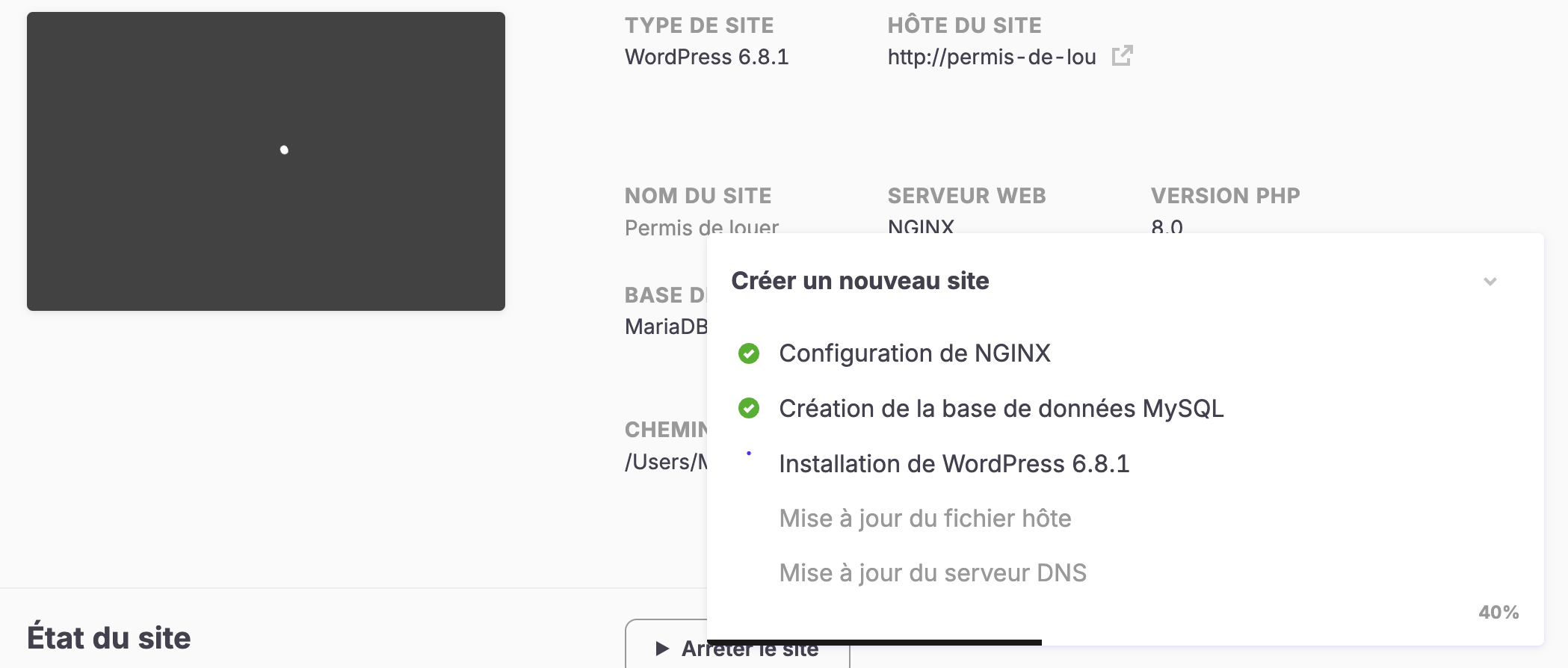
If I restart the app, it’s then stuck at this step :

My log file ends with something like that :
```auto
},
{
version: '4.4.33',
downloadLink: 'https://downloads.w.org/release/wordpress-4.4.33.zip'
},
{
version: '4.3.34',
downloadLink: 'https://downloads.w.org/release/wordpress-4.3.34.zip'
},
{
version: '4.2.38',
downloadLink: 'https://downloads.w.org/release/wordpress-4.2.38.zip'
},
{
version: '4.1.41',
downloadLink: 'https://downloads.w.org/release/wordpress-4.1.41.zip'
}
]
[2025-06-25 11:07:57.905] [info] [setWpVersions] last wp version: 6.8.1
```
I’ve reinstalled everything, deleted everything expect for my DevKinsta work folder that I moved to start fresh.
\*\*
---
### Author:  [@VladimirM](https://community.kinsta.com/u/VladimirM)
#### Post date: [June 25, 2025, 9:36am UTC](https://community.kinsta.com/t/cant-use-the-app-and-lost-access-to-my-dev-website/5210/2 "2025-06-25T09:36:54Z")
Hello @Mathieu 👋
Sorry to hear you’re having troubles with DevKinsta.
Can you please provide me with the entire log file? I’ll redact it once you post it here. Thank you!
---
### Author:  [@Mathieu](https://community.kinsta.com/u/Mathieu)
#### Post date: [June 25, 2025, 9:37am UTC](https://community.kinsta.com/t/cant-use-the-app-and-lost-access-to-my-dev-website/5210/3 "2025-06-25T09:37:42Z")
Here it is @VladimirM
main.log [redacted]
---
### Author:  [@VladimirM](https://community.kinsta.com/u/VladimirM)
#### Post date: [June 25, 2025, 9:59am UTC](https://community.kinsta.com/t/cant-use-the-app-and-lost-access-to-my-dev-website/5210/5 "2025-06-25T09:59:55Z")
Thank you @Mathieu 🙏
There are different errors pointing to SITE\_CREATION process, access to database denied for ‘root’, missing devkinsta\_db container, etc.
Please do the following:
1. Quit DevKinsta completely
2. Delete all containers (not volumes) starting with devkinsta\_
3. Start DevKinsta again
All DevKinsta containers should be recreated.
If the error persists, please try downgrading Docker to 4.29.0 version.
Let me know if anything of the above helps.
---
### Author:  [@Mathieu](https://community.kinsta.com/u/Mathieu)
#### Post date: [June 25, 2025, 10:03am UTC](https://community.kinsta.com/t/cant-use-the-app-and-lost-access-to-my-dev-website/5210/6 "2025-06-25T10:03:07Z")
I’ve already tried to delete all containers and that’s when I reload the app that it’s stuck at the website configuration in my second screenshot.
The version of docker that you mention is a bit old. It would be better to find an alternative with the updated version 😕
---
### Author:  [@VladimirM](https://community.kinsta.com/u/VladimirM)
#### Post date: [June 25, 2025, 10:15am UTC](https://community.kinsta.com/t/cant-use-the-app-and-lost-access-to-my-dev-website/5210/7 "2025-06-25T10:15:37Z")
Just to check, are you using Windows or Mac/OS?
---
### Author:  [@Mathieu](https://community.kinsta.com/u/Mathieu)
#### Post date: [June 25, 2025, 10:16am UTC](https://community.kinsta.com/t/cant-use-the-app-and-lost-access-to-my-dev-website/5210/8 "2025-06-25T10:16:16Z")
MacOS with last version, on a M4
---
### Author:  [@VladimirM](https://community.kinsta.com/u/VladimirM)
#### Post date: [June 25, 2025, 10:17am UTC](https://community.kinsta.com/t/cant-use-the-app-and-lost-access-to-my-dev-website/5210/9 "2025-06-25T10:17:28Z")
My mistake, Docker version shouldn’t be a problem then.
When you said you deleted everything, did you mean delete containers only, or reinstalled DevKinsta and Docker?
---
### Author:  [@Mathieu](https://community.kinsta.com/u/Mathieu)
#### Post date: [June 25, 2025, 10:48am UTC](https://community.kinsta.com/t/cant-use-the-app-and-lost-access-to-my-dev-website/5210/10 "2025-06-25T10:48:33Z")
I tried to delete the containers and then to reinstall DevKinsta
---
### Author:  [@VladimirM](https://community.kinsta.com/u/VladimirM)
#### Post date: [June 25, 2025, 10:50am UTC](https://community.kinsta.com/t/cant-use-the-app-and-lost-access-to-my-dev-website/5210/11 "2025-06-25T10:50:14Z")
Thank you for the reply.
After reinstalling DevKinsta, did you put your old DevKinsta folder back, or is the above happening with a completely fresh install of Kinsta on load? Apologies for the back and forth. 🙏
---
### Author:  [@Mathieu](https://community.kinsta.com/u/Mathieu)
#### Post date: [June 25, 2025, 12:20pm UTC](https://community.kinsta.com/t/cant-use-the-app-and-lost-access-to-my-dev-website/5210/12 "2025-06-25T12:20:34Z")
I tried with a new folder, and had the problems I talked about.
---
### Author:  [@Mathieu](https://community.kinsta.com/u/Mathieu)
#### Post date: [June 25, 2025, 12:39pm UTC](https://community.kinsta.com/t/cant-use-the-app-and-lost-access-to-my-dev-website/5210/13 "2025-06-25T12:39:48Z")
I even deleted my config.json just to be sure.
---
### Author:  [@Mathieu](https://community.kinsta.com/u/Mathieu)
#### Post date: [June 25, 2025, 1:28pm UTC](https://community.kinsta.com/t/cant-use-the-app-and-lost-access-to-my-dev-website/5210/14 "2025-06-25T13:28:12Z")
If you need me to connect to a meet.jit.si to share my screen or my config, feel free to send me a link in PM and I will gladly help. I know that it can be hard to debug without viewing anything.
I really need to get my setup back ☹
---
### Author:  [@VladimirM](https://community.kinsta.com/u/VladimirM)
#### Post date: [June 25, 2025, 1:29pm UTC](https://community.kinsta.com/t/cant-use-the-app-and-lost-access-to-my-dev-website/5210/15 "2025-06-25T13:29:29Z")
If you have your data (files, and database) from the site you worked on saved, and you don’t have other containers you can try.
1. Quitting both DevKinsta and Docker completely (not just DevKinsta) and starting again
2. If it gets stuck again, and you don’t have other containers/volumes unrelated to DevKinsta in Docker, you can stop both, remove both and install a fresh copy of DevKinsta and Docker.
---
### Author:  [@Mathieu](https://community.kinsta.com/u/Mathieu)
#### Post date: [June 25, 2025, 1:43pm UTC](https://community.kinsta.com/t/cant-use-the-app-and-lost-access-to-my-dev-website/5210/16 "2025-06-25T13:43:36Z")
I’ve restarted docker completly and devkinsta (with no containers from kinsta) and stopped all my others dockers, but it’s still stuck here :

---
### Author:  [@VladimirM](https://community.kinsta.com/u/VladimirM)
#### Post date: [June 25, 2025, 1:57pm UTC](https://community.kinsta.com/t/cant-use-the-app-and-lost-access-to-my-dev-website/5210/17 "2025-06-25T13:57:38Z")
Thank you for writing back!
I’m afraid I’ll have to consult our developers in regards to this one. In cases similar to this, removing both DevKinsta and Docker completely and reinstalling them usually solves the issue, but you need to be certain you have your data backed up before that.
You stated you saved the directory, do you have both files and the database? If you do, you can try manually migrating those to a site (live or staging) on Kinsta, if you have a slot available.
If you don’t have the data backup, please don’t delete anything until our engineers get to check this.
I regret to say that I need to set expectations and this might take 24 hours.
I really thank you for your patience 🙏
---
### Author:  [@Mathieu](https://community.kinsta.com/u/Mathieu)
#### Post date: [June 25, 2025, 2:03pm UTC](https://community.kinsta.com/t/cant-use-the-app-and-lost-access-to-my-dev-website/5210/19 "2025-06-25T14:03:08Z")
Yes unfortunatly, removing my docker install is not an option, I use it a lot with other projects…
---
### Author:  [@Adrian\_L](https://community.kinsta.com/u/Adrian_L)
#### Post date: [June 25, 2025, 11:51pm UTC](https://community.kinsta.com/t/cant-use-the-app-and-lost-access-to-my-dev-website/5210/20 "2025-06-25T23:51:49Z")
While DevKinsta is stuck on startup, could you please check the statuses of the DevKinsta containers in your Docker Desktop? Hopefully, this will help us determine which specific DevKinsta container is causing the issues.
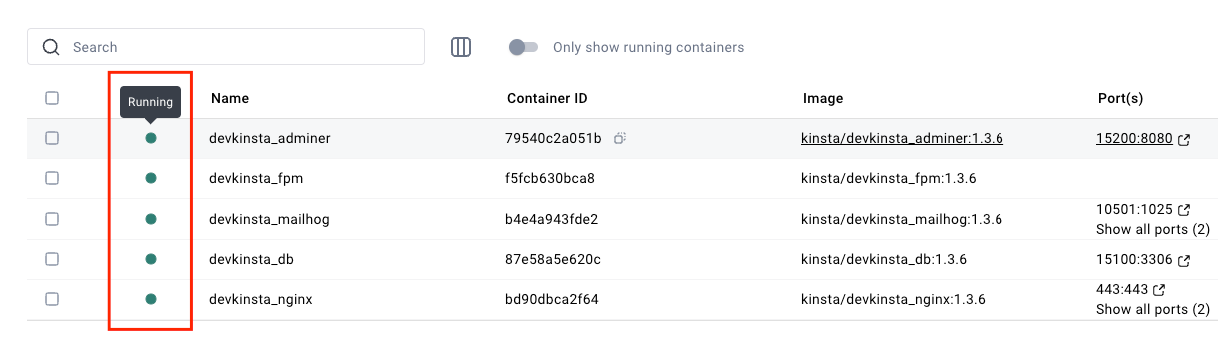
---
### Author:  [@Mathieu](https://community.kinsta.com/u/Mathieu)
#### Post date: [June 26, 2025, 7:37am UTC](https://community.kinsta.com/t/cant-use-the-app-and-lost-access-to-my-dev-website/5210/21 "2025-06-26T07:37:19Z")
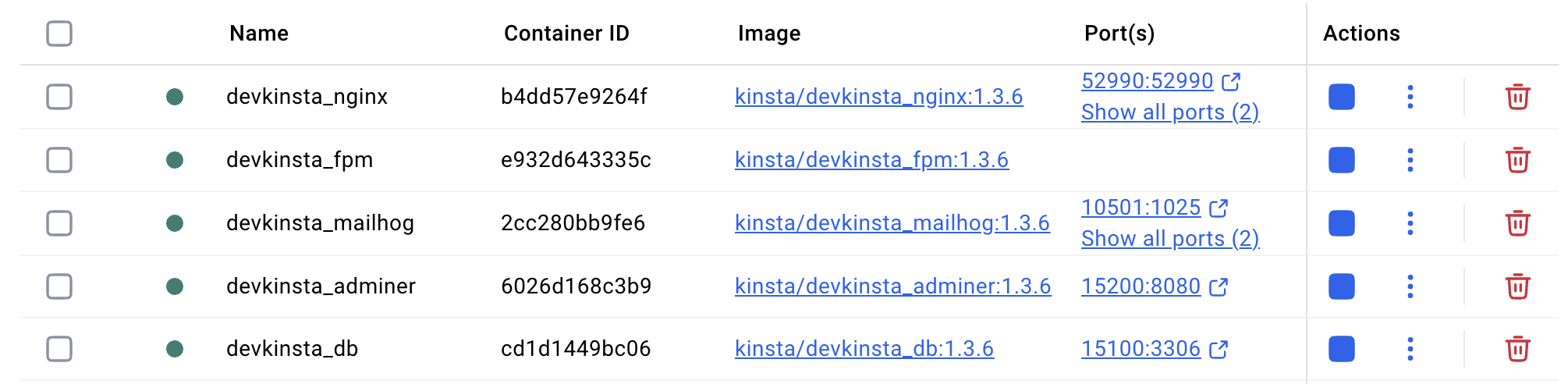
Yep
---
### Author:  [@VladimirM](https://community.kinsta.com/u/VladimirM)
#### Post date: [June 26, 2025, 8:49am UTC](https://community.kinsta.com/t/cant-use-the-app-and-lost-access-to-my-dev-website/5210/22 "2025-06-26T08:49:57Z")
Hello again 👋
Before I provide next steps, can you please send me the main.log again to see what are the latest errors? Thank you!
[Next page](https://community.kinsta.com/t/cant-use-the-app-and-lost-access-to-my-dev-website/5210.md?page=2)