# DK0033 - Multiple Issues with DevKinsta Installation with Docker Desktop on Windows 10 Pro 64
**URL:** https://community.kinsta.com/t/dk0033-multiple-issues-with-devkinsta-installation-with-docker-desktop-on-windows-10-pro-64/1272
**Category:** Bug Reports
**Created:** [February 3, 2022, 10:07pm UTC](https://community.kinsta.com/t/dk0033-multiple-issues-with-devkinsta-installation-with-docker-desktop-on-windows-10-pro-64/1272 "2022-02-03T22:07:38Z")
**Posts on this page:** 7
**Page:** 1
### Author:  [@weskyprint](https://community.kinsta.com/u/weskyprint)
#### Post date: [February 3, 2022, 10:07pm UTC](https://community.kinsta.com/t/dk0033-multiple-issues-with-devkinsta-installation-with-docker-desktop-on-windows-10-pro-64/1272/1 "2022-02-03T22:07:38Z")
**Q: Date/Time this occurred (Provide your time zone also)**
**A:03:31 - IST 4/2/2022 - Mumbai / Kolkata**
**Q: DevKinsta Version**
**A:Latest 2.4.0.2956**
**Q: OS Version**
**A:Windows 10 Pro 64**
**Q: Docker Desktop Version**
**A:Latest 4.4.4.73704**
**Q: Were any error codes or messages observed? If so, what were they?**
**A:DK0033 (Constant - Still Persistent - Unable to Authenticate Database Manually) and DK009 (Does Not Persist after Re-Install Docker Desktop and DevKinsta)**
**Q: Detailed Description of the Problem**
**A:Create New Site via DevKinsta does not function as expected. The product needs improvement**
---
### Author:  [@Kevin](https://community.kinsta.com/u/Kevin)
#### Post date: [February 3, 2022, 10:56pm UTC](https://community.kinsta.com/t/dk0033-multiple-issues-with-devkinsta-installation-with-docker-desktop-on-windows-10-pro-64/1272/2 "2022-02-03T22:56:13Z")
Hello @weskyprint, welcome to DevKinsta!
I too use Windows 10 Pro but have never gotten these errors. BOth seem to be because of Docker Desktop, though. We have solutions for each code here: [DevKinsta Error Codes - Kinsta®](https://kinsta.com/knowledgebase/devkinsta/error-codes/)
However, can you try force closing DevKinsta then Clen/Purge data within Docker(assuming this is a brand new install and you don’t mind completely resetting)? After that see if DevKinsta will start correctly/create the containers.
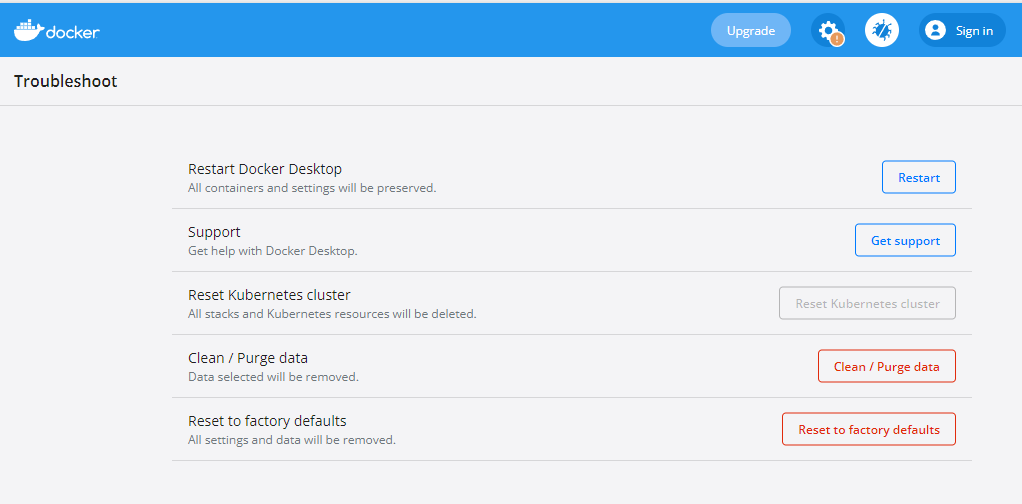
After this, could you also share whether all of your containers are running?

---
### Author:  [@weskyprint](https://community.kinsta.com/u/weskyprint)
#### Post date: [February 4, 2022, 5:04am UTC](https://community.kinsta.com/t/dk0033-multiple-issues-with-devkinsta-installation-with-docker-desktop-on-windows-10-pro-64/1272/3 "2022-02-04T05:04:05Z")
Hey Kevin, thank you for the run through. It took me about 4 hours last night to work on a solution to setup DevKinsta and get it to work correctly but with no luck.
After reading through all the articles tagged with the Error Code DK0033 - Cannot connect to Database I tried the following -
Disable and completely drop UAC on Windows
Uninstall Firewall and Antivirus
Set Inbound Rules on Firewall granting access to specific ports as displayed in Docker Desktop
Remove and Reinstall container and images along with DevKinsta via Windows Command Prompt
Constant Error at Container Level - maria\_db - Unable to authenticate due to wrong password.
Unable to change Password for the respective container via CLI for maria\_db\_database inspite of whats reflected on DevKinsta as the password
This is really frustrating for a user to move across the native AWS to container ecosystem.
I’m gonna purge data now and try getting it to work if it may!
---
### Author:  [@weskyprint](https://community.kinsta.com/u/weskyprint)
#### Post date: [February 4, 2022, 6:17am UTC](https://community.kinsta.com/t/dk0033-multiple-issues-with-devkinsta-installation-with-docker-desktop-on-windows-10-pro-64/1272/4 "2022-02-04T06:17:33Z")
Alright, so after digging deeper with troubleshooting, I have realised this needs to be manually setup from our end on each installation
When faced with an Error DK00033 - Inside Logs you will find that maria\_db password needs to change
Click on maria\_db inside of Docker Desktop and Open the CLI
Enter the command mysql -u root -p and enter the password
Enter the command
ALTER USER root@localhost IDENTIFIED VIA mysql\_native\_password;
SET PASSWORD = PASSWORD(‘changethistodevkinstapasswordwithquotes’);
You will need to replace changethistodevkinstapasswordwithquotes with Password in Site Info inside DevKinsta
Hence the new command will look like
ALTER USER root@localhost IDENTIFIED VIA mysql\_native\_password;
SET PASSWORD = PASSWORD(‘UPizk43xJuouD0pX’);
Click Retry and it will complete the install process.
---
### Author:  [@weskyprint](https://community.kinsta.com/u/weskyprint)
#### Post date: [February 4, 2022, 8:23am UTC](https://community.kinsta.com/t/dk0033-multiple-issues-with-devkinsta-installation-with-docker-desktop-on-windows-10-pro-64/1272/5 "2022-02-04T08:23:48Z")
[http://localhost:15100/](http://localhost:15100/) - Open in Browser does not work
Also - Error - SQLSTATE[HY000] [2006] MySQL server has gone away devkinsta
devkinsta\_db is running and Commands are accessible via CLI
Database Table Exists
Unable to Move Forward from WordPress Setup Step 1 - [http://127.0.0.1/wp-admin/setup-config.php?step=1](http://127.0.0.1/wp-admin/setup-config.php?step=1)
"Below you should enter your database connection details. If you’re not sure about these, contact your host.
Database Name
wordpress
The name of the database you want to use with WordPress.
Username
username
Your database username.
Password
password
Your database password.
Database Host
localhost
You should be able to get this info from your web host, if localhost doesn’t work.
Table Prefix
wp\_
If you want to run multiple WordPress installations in a single database, change this."
PROBLEM -
Error establishing a database connection
Please advise
---
### Author:  [@Kevin](https://community.kinsta.com/u/Kevin)
#### Post date: [February 5, 2022, 2:01am UTC](https://community.kinsta.com/t/dk0033-multiple-issues-with-devkinsta-installation-with-docker-desktop-on-windows-10-pro-64/1272/6 "2022-02-05T02:01:23Z")
Thanks for all the info @weskyprint
It seems like something is definitely off in the initial setup phase. Is your hosts file even getting modified correctly by Docker? Your new site shouldn’t be accessible from 127.0.0.1 or at least that should redirect you to an actual domain with a .local TLD. It almost sounds like it’s not being installed with administrator privileges but I’m not 100% certain based on your errors.
Is Docker conflicting with some other local environment you have set up now or in the past?
Can you do a factory setting reset of Docker then start DevKinsta. I assume you’ll get the same errors but can you get us a copy of the main.log? On Windows it ends up in C:\Users\username\AppData\Roaming\DevKinsta\logs

---
### Author:  [@system](https://community.kinsta.com/u/system)
#### Post date: [February 8, 2022, 2:02am UTC](https://community.kinsta.com/t/dk0033-multiple-issues-with-devkinsta-installation-with-docker-desktop-on-windows-10-pro-64/1272/7 "2022-02-08T02:02:21Z")
This topic was automatically closed 3 days after the last reply. New replies are no longer allowed.