# Error at creating MySQL
**URL:** https://community.kinsta.com/t/error-at-creating-mysql/2815
**Category:** Application Support
**Created:** [December 7, 2023, 10:51am UTC](https://community.kinsta.com/t/error-at-creating-mysql/2815 "2023-12-07T10:51:06Z")
**Posts on this page:** 20
**Page:** 1
### Author:  [@jazzyguy](https://community.kinsta.com/u/jazzyguy)
#### Post date: [December 7, 2023, 10:51am UTC](https://community.kinsta.com/t/error-at-creating-mysql/2815/1 "2023-12-07T10:51:06Z")
Hello to all,
My configuration on a MacBook Pro :
MacOS 12.7.1
DevKinsta 2.11.0
PHP 8.1
WordPress 6.4.1
Docker Desktop 4.26.0
During the installation of a saved WordPress site, I get the error “Something bad happened” at the MySQL step : hereafter is the devkinsta\_nginx container log that I get from that tentative local DevKinsta installation, retrieving an existing WordPress site : would you give me any hint to solve this issue ?
Thank you in advance,
2023-12-07 11:27:37 /docker-entrypoint.sh: /docker-entrypoint.d/ is not empty, will attempt to perform configuration
2023-12-07 11:27:37 /docker-entrypoint.sh: Looking for shell scripts in /docker-entrypoint.d/
2023-12-07 11:27:37 /docker-entrypoint.sh: Launching /docker-entrypoint.d/10-listen-on-ipv6-by-default.sh
2023-12-07 11:27:37 10-listen-on-ipv6-by-default.sh: info: /etc/nginx/conf.d/default.conf is not a file or does not exist
2023-12-07 11:27:37 /docker-entrypoint.sh: Launching /docker-entrypoint.d/20-envsubst-on-templates.sh
2023-12-07 11:27:37 /docker-entrypoint.sh: Launching /docker-entrypoint.d/30-tune-worker-processes.sh
2023-12-07 11:27:37 /docker-entrypoint.sh: Configuration complete; ready for start up
2023-12-07 11:27:37 2023/12/07 10:27:37 [warn] 1#1: the “http2\_max\_field\_size” directive is obsolete, use the “large\_client\_header\_buffers” directive instead in /etc/nginx/nginx.conf:16
2023-12-07 11:27:37 nginx: [warn] the “http2\_max\_field\_size” directive is obsolete, use the “large\_client\_header\_buffers” directive instead in /etc/nginx/nginx.conf:16
2023-12-07 11:27:37 2023/12/07 10:27:37 [warn] 1#1: the “http2\_max\_header\_size” directive is obsolete, use the “large\_client\_header\_buffers” directive instead in /etc/nginx/nginx.conf:17
2023-12-07 11:27:37 nginx: [warn] the “http2\_max\_header\_size” directive is obsolete, use the “large\_client\_header\_buffers” directive instead in /etc/nginx/nginx.conf:17
2023-12-07 11:30:39 2023/12/07 10:30:39 [warn] 1#1: the “http2\_max\_field\_size” directive is obsolete, use the “large\_client\_header\_buffers” directive instead in /etc/nginx/nginx.conf:16
2023-12-07 11:30:39 2023/12/07 10:30:39 [warn] 1#1: the “http2\_max\_header\_size” directive is obsolete, use the “large\_client\_header\_buffers” directive instead in /etc/nginx/nginx.conf:17
2023-12-07 11:31:40 2023/12/07 10:31:40 [warn] 1#1: the “http2\_max\_field\_size” directive is obsolete, use the “large\_client\_header\_buffers” directive instead in /etc/nginx/nginx.conf:16
2023-12-07 11:31:40 2023/12/07 10:31:40 [warn] 1#1: the “http2\_max\_header\_size” directive is obsolete, use the “large\_client\_header\_buffers” directive instead in /etc/nginx/nginx.conf:17
---
### Author:  [@Agus](https://community.kinsta.com/u/Agus)
#### Post date: [December 15, 2023, 1:01am UTC](https://community.kinsta.com/t/error-at-creating-mysql/2815/2 "2023-12-15T01:01:57Z")
Hello @jazzyguy 👋 and welcome to Kinsta Community!
To clarify, did you get that error “Something bad happened” at the MySQL step, when you tried to import your WordPress site from your MyKinsta account? cause I’m not quite sure understand when you said “_during the installation of a saved WordPress site_” (if you can please elaborate and clarify that? 🙂 )
Since it’s been more than a week ago, could you please give it another try now ? and if you’re still experiencing the same error message, please kindly provide us with the following:
1. The screenshot showing that “Something bad happened” error in your DevKinsta
2. The most recent [`main.log` file generated by DevKinsta](https://kinsta.com/docs/devkinsta/devkinsta-troubleshooting/error-codes#viewing-the-application-log-file)
We will check and review it further from that `main.log` instead, and will see what may be causing that error.
Best regards,
Agus
---
### Author:  [@jazzyguy](https://community.kinsta.com/u/jazzyguy)
#### Post date: [December 16, 2023, 10:50am UTC](https://community.kinsta.com/t/error-at-creating-mysql/2815/3 "2023-12-16T10:50:03Z")
Hello Agus,
Thank you for your answer.
As I am using a local installation of my site for testing, so far with MAMP [http://localhost:8888/wordpress/wp-admin/](http://localhost:8888/wordpress/wp-admin/), I tried to perform a similar set-up with DevKinsta, and got this behaviour :
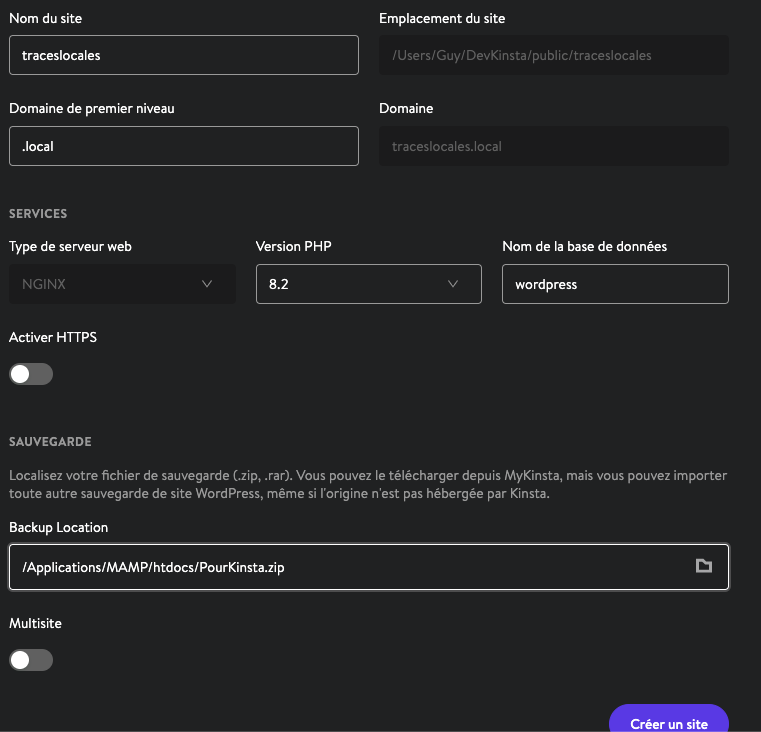
- defining the input data (see InputData image)
- checking wp-config.php (see wp-config image)
- launching DevKinsta (see InputPanel image)
- job aborting on error (see ErrorDK0081 image)
- attaching the most recent main.log file of DevKinsta
[main.log](https://community.kinsta.com/uploads/short-url/cXpP0d7Wyul1mRaaTefLucWZfw1.log) (58.5 KB)
Thank you in advance for your help,
---
### Author:  [@Andrew](https://community.kinsta.com/u/Andrew)
#### Post date: [December 16, 2023, 5:58pm UTC](https://community.kinsta.com/t/error-at-creating-mysql/2815/4 "2023-12-16T17:58:02Z")
Hi @jazzyguy!
Thank you for sharing those screenshots and the main log. After reviewing the main log data I am seeing an error indicating that the wp-config.php file itself cannot be found during the site creation. This type of error indicates that the backup archive is either missing the wp-config.php file entirely, or the file is located in an incorrect directory. Below is a snippet from the log you shared showing this error:
`[2023-12-16 00:47:11.758] [error] Error - DK0081: WP_PARSE_CONFIG: wp-config.php not found`
I see from your screenshot however that the extracted archive appears to contain the file in the public directory.
Something that can be tried is to move the files/folders from within the public directory up into the PourKinsta directory itself that currently contains the SQL file. After moving the files/folders up into this directory, you may archive the folder yourself into a ZIP archive. You can then use this archive instead to attempt to create the site again.
You may find instructions on how to create a ZIP archive on your Mac at the link below:
> **[Zip and unzip files and folders on Mac](https://support.apple.com/guide/mac-help/zip-and-unzip-files-and-folders-on-mac-mchlp2528/mac)**
>
> In the Finder on your Mac, compress files to make a backup copy of your data, or send information over the internet.
Please do let us know if this helps resolve the issue, or if you continue to experience any difficulty with creating the site. We look forward to working with you to find a solution!
Best regards
---
### Author:  [@jazzyguy](https://community.kinsta.com/u/jazzyguy)
#### Post date: [December 17, 2023, 10:28am UTC](https://community.kinsta.com/t/error-at-creating-mysql/2815/5 "2023-12-17T10:28:06Z")
Hello Andrew,
Thank you for your answer.
After a new trial, using the input data on a single level with the SQL wordpress data base, I still get that DK0081 Error :
- defining the input data (see InputData\_1 image)

- checking wp-config.php (see wp-config image)

- launching DevKinsta (see InputPanel image)
- job aborting on error (see ErrorDK0081 image)

- attaching the most recent main.log file of DevKinsta
[main.log](https://community.kinsta.com/uploads/short-url/whSPpjDJyzGFfZR2hQRrEkfn59x.log) (112.7 KB)
After a quick review of this log file, I thought that maybe I should avoid creating the DROP option when exporting the wordpress database from the existing WP site ?
Thank you again, in advance for your help,
---
### Author:  [@Andrew](https://community.kinsta.com/u/Andrew)
#### Post date: [December 17, 2023, 6:23pm UTC](https://community.kinsta.com/t/error-at-creating-mysql/2815/6 "2023-12-17T18:23:07Z")
Hi @jazzyguy!
Thank you for your reply, and providing the updated screenshots and main log. It does appear the command run to DROP the database occurs after the issue locating the wp-config.php file. So, I am unsure if that is contributing to this issue at all.
I am seeing some errors indicating there might be a problem communicating with the Docker service. Just to confirm, have you tried fully quitting both DevKinsta, and Docker desktop and then relaunching both? Also, just to confirm does the Docker engine state it is running from within the Docker desktop application?
We will continue to investigate into this issue internally and will update this thread once we have more information to share.
Best regards
---
### Author:  [@jazzyguy](https://community.kinsta.com/u/jazzyguy)
#### Post date: [December 17, 2023, 9:04pm UTC](https://community.kinsta.com/t/error-at-creating-mysql/2815/7 "2023-12-17T21:04:20Z")
Thank you for your follow-up, Andrew.
Yes, Docker is running from Docker Desktop, as you can see on the following screen capture of the last tentative running, giving again a DK0081 error.

Here is the last log file.
[main.log](https://community.kinsta.com/uploads/short-url/kWXCEMFsaJ8jS3DzeP6uzO4ly8h.log) (188.4 KB)
Regards,
---
### Author:  [@Andrew](https://community.kinsta.com/u/Andrew)
#### Post date: [December 17, 2023, 10:49pm UTC](https://community.kinsta.com/t/error-at-creating-mysql/2815/8 "2023-12-17T22:49:02Z")
Thank you for sharing that updated screenshot and log. We are investigating this further internally and will update this thread once we have more details to share.
Best regards
---
### Author:  [@Adrian\_L](https://community.kinsta.com/u/Adrian_L)
#### Post date: [December 18, 2023, 1:53am UTC](https://community.kinsta.com/t/error-at-creating-mysql/2815/9 "2023-12-18T01:53:56Z")
Hi @jazzyguy 👋
I suggest to do the following:
1. To get started, I suggest extracting again the .zip file in your local computer. Make sure that the file structure contains the “/public” folder that stores the WP files and the wordpress.sql file is at the root folder. As shown below:

2. Once done, you should run the command line (via “Terminal”) to set files/folders permission recursively, inside that extracted folder with something like:
find . -type d -exec chmod 755 {} ; && find . -type f -exec chmod 644 {} ;
This is necessary just in case if the wp-config.php has permission issue “after it’s extracted” and that DevKinsta couldn’t “read/see” it properly. You should also set the ownership of your files/folders with your correct local user account.
1. Once the permission issue has been fixed, create a new zip file again from it, and see if you can import it to your DevKinsta.
If the above recommendation doesn’t work. You may want to consider trying to import the backup manually as described in our documentation here:
> **[DevKinsta - Kinsta Integration - Kinsta® Docs](https://kinsta.com/docs/devkinsta/devkinsta-integration#manually-import-a-backup)**
>
> Find out how you can integrate your MyKinsta sites with DevKinsta.
I hope that the above information helps!
Best Regards.
Adrian L.
---
### Author:  [@jazzyguy](https://community.kinsta.com/u/jazzyguy)
#### Post date: [December 18, 2023, 2:57pm UTC](https://community.kinsta.com/t/error-at-creating-mysql/2815/10 "2023-12-18T14:57:40Z")
Thank you for your suggestion.
Can you help me fixing this syntax error ?

---
### Author:  [@Jake](https://community.kinsta.com/u/Jake)
#### Post date: [December 18, 2023, 3:29pm UTC](https://community.kinsta.com/t/error-at-creating-mysql/2815/11 "2023-12-18T15:29:12Z")
Hey there @jazzyguy ! 👋
Based on the response, it looks like the syntax error is likely due to the preceding semicolon. Try escaping it by adding a backslash like this:
```auto
find . -type d -exec chmod 755 {} \; && find . -type f -exec chmod 644 {} \;
```
Hope that helps!
Best,
Jake L.
---
### Author:  [@jazzyguy](https://community.kinsta.com/u/jazzyguy)
#### Post date: [February 5, 2024, 9:40pm UTC](https://community.kinsta.com/t/error-at-creating-mysql/2815/12 "2024-02-05T21:40:17Z")
Thank you, Jake.
I performed the suggested modification, but I’m still stuck with this DK0081 parsing error.
Would you be willing to investigate my input data if I send it to you (1.28 GB) ?
Best regards,
---
### Author:  [@VladimirM](https://community.kinsta.com/u/VladimirM)
#### Post date: [February 6, 2024, 11:17am UTC](https://community.kinsta.com/t/error-at-creating-mysql/2815/13 "2024-02-06T11:17:47Z")
Hello @jazzyguy 👋
We are not able to accept the files of your site, unfortunately. Also this is a local issue on your end so it is likely that we wouldn’t be able to replicate the exact same issue.
What I would advise is to import manually.
> **[DevKinsta - Kinsta Integration - Kinsta® Docs](https://kinsta.com/docs/devkinsta/devkinsta-integration#manually-import-a-backup)**
>
> Find out how you can integrate your MyKinsta sites with DevKinsta.
You can create a new DevKinsta Site, open a Site Path of the new empty DevKinsta site, delete the wp-content folder, and move the one from the backup you have to the DevKinsta new site.
Then, you would proceed and drop all tables from the database and manually import SQL file from your backup.
Let us know if this helps.
---
### Author:  [@jazzyguy](https://community.kinsta.com/u/jazzyguy)
#### Post date: [February 8, 2024, 10:54pm UTC](https://community.kinsta.com/t/error-at-creating-mysql/2815/14 "2024-02-08T22:54:52Z")
Hello,
Thank you for your suggestion, but here is the error I get when trying to create an empty site :

(I had predefined the WP admin username and password in the parameters)
---
### Author:  [@Andrew](https://community.kinsta.com/u/Andrew)
#### Post date: [February 9, 2024, 1:55am UTC](https://community.kinsta.com/t/error-at-creating-mysql/2815/15 "2024-02-09T01:55:09Z")
Hi @jazzyguy!
Thank you for your reply. I’m sorry to see that you are also having difficulty with creating a new empty site. I would like to review the current main.log file to see what error was logged. Could you please send me a direct message with the updated main.log file?
Also, to confirm is your DevKinsta and Docker Desktop installations up to date?
We look forward to hearing back from you!
---
### Author:  [@jazzyguy](https://community.kinsta.com/u/jazzyguy)
#### Post date: [February 9, 2024, 10:20am UTC](https://community.kinsta.com/t/error-at-creating-mysql/2815/16 "2024-02-09T10:20:35Z")
Thank you for your answer.
Yes, the DevKinsta (Version 2.13.1 (2.13.1.8585)) and Docker Desktop (Version 4.27.1 (136059)) installations are up to date.
Here is the main.log file.
Redacted main.log (Kinsta staff edit)
---
### Author:  [@Andrew](https://community.kinsta.com/u/Andrew)
#### Post date: [February 9, 2024, 6:52pm UTC](https://community.kinsta.com/t/error-at-creating-mysql/2815/18 "2024-02-09T18:52:43Z")
Hi @jazzyguy!
Thanks for your reply, and for sharing the updated main.log file! We have reviewed the log file and see it looks like there is a permission denied error occurring when attempting to make a connection to the database as root. This indicates something may have caused the root password used by DevKinsta to become out of sync with the database container.
The first thing we can try is to remove the DevKinsta related Docker containers, and recreate them. To do this you may first exit DevKinsta completely. This can be done by existing the DevKinsta window, and then locating the DevKinsta icon in the upper status bar, right click the icon, and then choose to quit DevKinsta.
Once DevKinsta has been completely exited this will shutdown the Docker containers. Next, open the Docker Desktop interface and select all of the DevKinsta containers and choose to delete them. This won’t affect the site files that exist on your system.
After the containers have been deleted you may relaunch DevKinsta. This will recreate the containers, and hopefully sync up the root database password.
Please let us know if performing these steps help resolve the issue, or if any problems persist.
Best regards
---
### Author:  [@jazzyguy](https://community.kinsta.com/u/jazzyguy)
#### Post date: [February 10, 2024, 10:10am UTC](https://community.kinsta.com/t/error-at-creating-mysql/2815/19 "2024-02-10T10:10:00Z")
Hello,
After having deleted the DevKinsta related Docker containers, then relaunched DevKinsta, Il still get the same problem, as you can see in the attached main.log
Redacted main.log (Kinsta staff edit)
Regards,
---
### Author:  [@Andrew](https://community.kinsta.com/u/Andrew)
#### Post date: [February 10, 2024, 9:59pm UTC](https://community.kinsta.com/t/error-at-creating-mysql/2815/20 "2024-02-10T21:59:57Z")
Thank you for sharing the updated main.log file, @jazzyguy! We are continuing to investigate into this issue and will provide an update as soon as we have more details to share.
We appreciate your patience while we further look into this.
Best regards
---
### Author:  [@andre](https://community.kinsta.com/u/andre)
#### Post date: [February 13, 2024, 2:34pm UTC](https://community.kinsta.com/t/error-at-creating-mysql/2815/24 "2024-02-13T14:34:57Z")
Hi @jazzyguy 👋
Thank you for your patience in regards to this!
Could you please try these steps and let us know if it resolves the issue for you?
1. Edit `config.json`, and remove the line with the DB password - look for something like this:
“services”: {
“host”: “127.0.0.1”,
“mariadb”: {
“name”: “devkinsta\_db”,
“user”: “root”,
“password”: “\*\*\*\*\*\*\*\*\*\*”, ← REMOVE THIS ENTIRE LINE
“containerId”: “devkinsta\_db”,
“port”: “15100”
},
2. Stop DevKinsta if it is/was running.
3. Remove all the DevKinsta containers using Docker Desktop or CLI.
4. Restart DevKinsta.
Thank you in advance!
Sincerely,
Andre F.
[Next page](https://community.kinsta.com/t/error-at-creating-mysql/2815.md?page=2)