# Error: Something bad happened - when trying to import site from myKinsta
**URL:** https://community.kinsta.com/t/error-something-bad-happened-when-trying-to-import-site-from-mykinsta/5661
**Category:** Bug Reports
**Created:** [November 3, 2025, 11:13pm UTC](https://community.kinsta.com/t/error-something-bad-happened-when-trying-to-import-site-from-mykinsta/5661 "2025-11-03T23:13:11Z")
**Posts on this page:** 20
**Page:** 1
### Author:  [@wpcreative-jw](https://community.kinsta.com/u/wpcreative-jw)
#### Post date: [November 3, 2025, 11:13pm UTC](https://community.kinsta.com/t/error-something-bad-happened-when-trying-to-import-site-from-mykinsta/5661/1 "2025-11-03T23:13:11Z")
**Q: Date/Time this occurred (Provide your time zone also)**
**3/5/2025 (UK)**
**Q: DevKinsta Version**
Version 2.13.5 (2.13.5.9020)
**Q: OS Version**
**A: MacOS** 15.6.1 (24G90)
**Q: Docker Desktop Version**
**A:** 4.49.0 (208700)
**Q: Were any error codes or messages observed? If so, what were they?**
**A: Something bad happened**
**Q: Detailed Description of the Problem**
**A: I cant pull any sites from myKinsta. I have removed and reinstalled devKinsta and docker several times and get the same error. I can share the log file privately if that helps.**
---
### Author:  [@Adrian\_L](https://community.kinsta.com/u/Adrian_L)
#### Post date: [November 4, 2025, 12:31am UTC](https://community.kinsta.com/t/error-something-bad-happened-when-trying-to-import-site-from-mykinsta/5661/2 "2025-11-04T00:31:12Z")
Hi @wpcreative-jw
Welcome back! 🙂
Can you try the steps in this thread:
> [@Dev kinsta is stuck Something bad happened](https://community.kinsta.com/t/dev-kinsta-is-stuck-something-bad-happened/5645/2):
>
> Hi @Olivier_Bigras Welcome to the Kinsta Community! If you currently have no working local sites, it may be easier to delete all the DevKinsta containers, images, and volumes in Docker Desktop. Doing this will allow you to start DevKinsta with a fresh setup the next time you launch it. Please note that deleting the “Volumes” will remove all your custom data associated with local sites in the DevKinsta app. Otherwise, please send me the main.log file via private message so we can tak…
If that doesn’t work, you can also try this:
> [@DevKinsta Disk Space Issue, Database Authentication Error After Docker Restart](https://community.kinsta.com/t/devkinsta-disk-space-issue-database-authentication-error-after-docker-restart/5647):
>
> Just sharing some potential bugs, and how I worked through them. I recently got a new MacBook Pro (M4 Pro) and downloaded Dev Kinsta and Docker Desktop to pull down my sites but I kept running into the following issues: DevKinsta repeatedly shows “disk almost full” warning on fresh installation and would not import or create any site. To fix the disk space error, I needed to increase Docker disk sizes, removing all containers, images, and volumes, and restart DevKinsta Then, any site creation …
If the issue still persists, please send me via DM the main.log file of Devkinsta.
---
### Author:  [@wpcreative-jw](https://community.kinsta.com/u/wpcreative-jw)
#### Post date: [November 4, 2025, 12:21pm UTC](https://community.kinsta.com/t/error-something-bad-happened-when-trying-to-import-site-from-mykinsta/5661/3 "2025-11-04T12:21:10Z")
Tried both solutions but not fixed, DMd you the log.
Thanks
---
### Author:  [@Adrian\_L](https://community.kinsta.com/u/Adrian_L)
#### Post date: [November 5, 2025, 3:50am UTC](https://community.kinsta.com/t/error-something-bad-happened-when-trying-to-import-site-from-mykinsta/5661/4 "2025-11-05T03:50:28Z")
Thanks for sharing the main.log file. The error that stands out is the following:
`ERROR 1045 (28000): Access denied for user 'root'@'localhost' (using password: YES)`
I also reviewed the site from Kinsta that you’re trying to pull, and I didn’t see any custom configuration on the site that could cause the pull action to fail.
Can you try one more time to delete all the DevKinsta containers, images, and volumes in the Docker Desktop? And this time, please also delete the contents inside this folder manually after.
> **[Reference - Uninstall DevKinsta - Kinsta® Docs](https://kinsta.com/docs/devkinsta/devkinsta-reference/uninstall-devkinsta/#mac-1)**
>
> Find out how to uninstall DevKinsta for a fresh start. Includes instructions for supported operating systems: Windows, macOS, or Linux.
- **User/Library/Application Support/DevKinsta** (application config)
- **User/DevKinsta** (site files)
Then after, reinstall Devkinsta and try to do the pull site action again.
Let me know how it goes!
---
### Author:  [@wpcreative-jw](https://community.kinsta.com/u/wpcreative-jw)
#### Post date: [November 5, 2025, 11:35am UTC](https://community.kinsta.com/t/error-something-bad-happened-when-trying-to-import-site-from-mykinsta/5661/6 "2025-11-05T11:35:20Z")
Followed all these steps as I have done previously and still getting the same error. I have sent you the updated log. Please advise as this is becoming quite frustrating.
Thanks
---
### Author:  [@wpcreative-jw](https://community.kinsta.com/u/wpcreative-jw)
#### Post date: [November 5, 2025, 4:15pm UTC](https://community.kinsta.com/t/error-something-bad-happened-when-trying-to-import-site-from-mykinsta/5661/8 "2025-11-05T16:15:49Z")
This has been dragging on for days now and is severely impacting my work. Can someone speak to me on the live chat to get this sorted rather than 24hrs between replies. As a customer who pays over $300 a month quick support to get this resolved is the least I expect.
---
### Author:  [@Adrian\_L](https://community.kinsta.com/u/Adrian_L)
#### Post date: [November 6, 2025, 3:39am UTC](https://community.kinsta.com/t/error-something-bad-happened-when-trying-to-import-site-from-mykinsta/5661/9 "2025-11-06T03:39:25Z")
Hi @wpcreative-jw
After uninstalling both DevKinsta and Docker Desktop multiple times, I was able to replicate the same error you’re experiencing. I tried the previous suggestions, but unfortunately, they didn’t work for me either. I’ve now reported this issue to our DevKinsta development team, and I’m hopeful we can resolve it soon. I apologize for any inconvenience this may cause. We will keep you updated as soon as new information becomes available.
---
### Author:  [@Seyed](https://community.kinsta.com/u/Seyed)
#### Post date: [November 8, 2025, 6:25pm UTC](https://community.kinsta.com/t/error-something-bad-happened-when-trying-to-import-site-from-mykinsta/5661/13 "2025-11-08T18:25:17Z")
Looks like devKinsta software issue. Is there any fix.. Development has been stopped for the past 3days.
---
### Author:  [@merineth](https://community.kinsta.com/u/merineth)
#### Post date: [November 9, 2025, 1:18am UTC](https://community.kinsta.com/t/error-something-bad-happened-when-trying-to-import-site-from-mykinsta/5661/14 "2025-11-09T01:18:19Z")
Hi @Seyed We’ve reported this issue to our DevKinsta development team and are waiting for further updates from their side. At the same time, we’re testing a potential workaround to address the issue in the meantime. We’ll make sure to keep you updated once we have more details.
---
### Author:  [@VladimirM](https://community.kinsta.com/u/VladimirM)
#### Post date: [November 10, 2025, 9:06am UTC](https://community.kinsta.com/t/error-something-bad-happened-when-trying-to-import-site-from-mykinsta/5661/15 "2025-11-10T09:06:40Z")
Hello @wpcreative-jw👋 As discussed in our chat, I’m posting a complete step by step instructions, if needed in the future.
@Seyed My colleague and I gave you the steps in the other threads, but I wanted to tag you here as well.
Note: This applies to fixing the issues with site creation that are caused by database access error (in DevKinsta main.log, it’s → ERROR 1045 (28000): Access denied for user ‘root’@‘localhost’ (using password: YES) ).
Part ONE - **RESETING ‘root’ USER PASSWORD**
1. Stop the devkinsta\_db container

2. Once the container is stopped, open Terminal and run this command:
`docker run --name devkinsta_reset_mariadb_root -v devkinsta_db_data:/var/lib/mysql/ -d mariadb:10.5.5 mysqld --skip-grant-tables`
This should create a new container devkinsta\_reset\_mariadb\_root.
3. In Docker Desktop, click on the new container ‘devkinsta\_reset\_mariadb\_root’.
4. Choose ‘Exec’
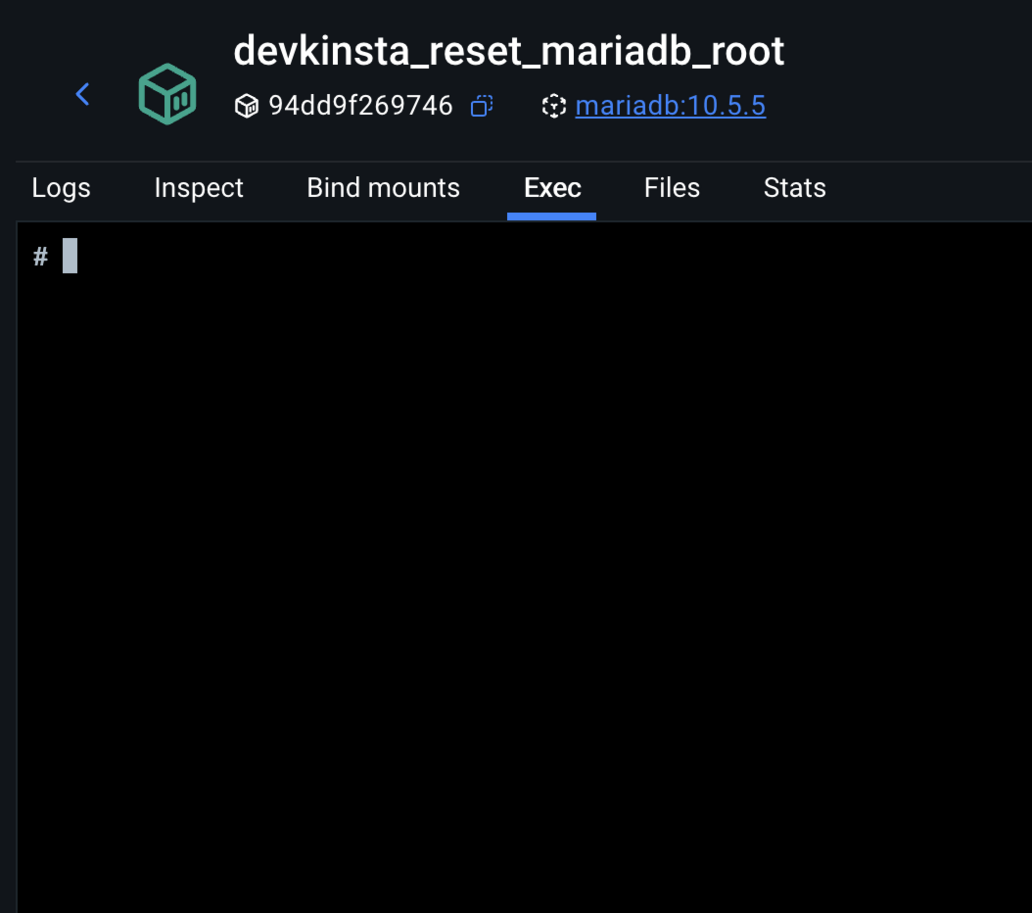
5. Run the following command: `mysql -u root -p. It will prompt you for a password but just press Enter.`
6. Run the following commands one by one:
`USE mysql; `
`FLUSH PRIVILEGES; `
`ALTER USER 'root'@'localhost' IDENTIFIED BY 'ENTER_THE_NEW_PASS_HERE'; `
`FLUSH PRIVILEGES;`
Replace ENTER\_THE\_NEW\_PASS\_HERE with a password of your choosing and remember it/copy it for later use.
The above steps are resetting the passwrod for ‘root’ user.
1. Switch back to Terminal. Delete the temporary Docker container by running the following in Terminal: `docker rm devkinsta_reset_mariadb_root -f`
2. Start the original devkinsta\_db container in Docker
At this point, the database error should be gone, but if it isn’t, complete the next set of steps as well.
Part two - **GRANTING PRIVILEGES TO ‘root’ USER**
Please execute the following commands from the Terminal one by one:
1. `docker exec -it devkinsta_db bash`
2. `mysql -u root -p`
(enter the password you created in previous set of steps)
3. `GRANT ALL PRIVILEGES ON *.* TO ‘root’@‘%’ IDENTIFIED BY ‘the password you created’ WITH GRANT OPTION;`
4. exit
5. exit
Part three - \*\*UPDATING DevKinsta config.json
\*\*
If you completed both sets of steps above and there was no change and the issue persists, you will need to check the password in config.json file.
Go to Finder → Go → Library → Application Support → DevKinsta. (If you don’t have ‘Library’ in Go (top bar), go to Finder, control-click anywhere in the directory and in Show View Options select “Show Library Folder”)
Once you are in DevKinsta directory, find config.json. Open it in any text editor that has ‘search’ feature. Search for ‘services’ and you should see a code like this:
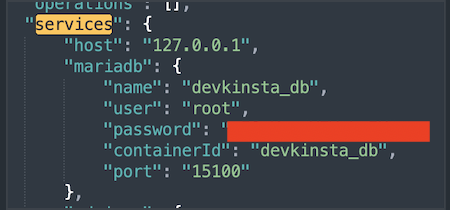
Update that to a password that you have set in the first set of commands.
This should resolve the issue and allow both new site creation and pulling sites from Mykinsta.
Kind regards!
---
### Author:  [@Seyed](https://community.kinsta.com/u/Seyed)
#### Post date: [November 10, 2025, 3:43pm UTC](https://community.kinsta.com/t/error-something-bad-happened-when-trying-to-import-site-from-mykinsta/5661/16 "2025-11-10T15:43:53Z")
This is not working and made it even worse.
---
### Author:  [@VladimirM](https://community.kinsta.com/u/VladimirM)
#### Post date: [November 11, 2025, 6:13am UTC](https://community.kinsta.com/t/error-something-bad-happened-when-trying-to-import-site-from-mykinsta/5661/17 "2025-11-11T06:13:10Z")
Hello Seyed 👋
Apologies for the back and forth. It’s possible there’s another issue, that some step was missed or not conducted properly, since the solution is complex. When I replicated the issue I had to run the full solution a few times before it worked.
Can you please send me the updated main.log from DevKinsta so I can recheck it and see if the error is the same? Many thanks.
---
### Author:  [@zayne](https://community.kinsta.com/u/zayne)
#### Post date: [April 8, 2026, 12:28pm UTC](https://community.kinsta.com/t/error-something-bad-happened-when-trying-to-import-site-from-mykinsta/5661/18 "2026-04-08T12:28:59Z")
* * *
# 🧠 Problem
On macOS (Apple silicon), DevKinsta fails when creating a new WordPress site.
### Symptoms:
- DevKinsta shows:
- Containers appear to be running normally (`docker ps` shows all services up)
- Docker has plenty of disk space
### Actual error from logs:
DevKinsta fails during the database step with:
```auto
Access denied for user 'root'@'localhost' (using password: YES)
```
This happens when it tries to:
- `CREATE DATABASE`
- and later `DROP DATABASE`
Example from logs:
* * *
# 🔍 Root Cause
MariaDB inside the `devkinsta_db` container is in a **broken authentication state** :
- The container sets a root password via:
- But MariaDB actually allows:
- And **rejects login with the password**
So you get a mismatch:
| What DevKinsta does | What MariaDB expects |
| --- | --- |
| Uses password | No password |
| → Fails | |
This causes all DB operations to fail, which breaks site creation.
* * *
# ✅ Solution
Fix the MariaDB root user to match the container’s expected password.
* * *
## Step 1 — Get the expected password
```auto
docker inspect devkinsta_db --format '{{range .Config.Env}}{{println .}}{{end}}' | grep MYSQL_ROOT_PASSWORD
```
* * *
## Step 2 — Confirm login mismatch
This fails:
```auto
docker exec devkinsta_db mysql -u root -p -e "SELECT 1;"
```
But this works:
```auto
docker exec devkinsta_db mysql -u root -e "SELECT 1;"
```
* * *
## Step 3 — Fix the root password
Run:
```auto
docker exec devkinsta_db mysql -u root -e "ALTER USER 'root'@'localhost' IDENTIFIED BY ''; FLUSH PRIVILEGES;"
```
* * *
## Step 4 — Verify fix
```auto
docker exec devkinsta_db mysql -u root -p -e "SELECT 1;"
```
Should return:
```auto
1
1
```
* * *
## Step 5 — Retry DevKinsta
Now creating a site works normally.
* * *
# ⚠ Important Notes
- The **“Docker disk is almost full” warning is misleading** in this case
- Docker storage was not actually the issue
- The real issue is **MariaDB auth mismatch inside the container**
* * *
# 💡 Summary
This is a DevKinsta/MariaDB initialization bug where:
> The root user is created without a password, but DevKinsta expects one.
Fixing the root password resolves the issue immediately.
* * *
---
### Author:  [@VladimirM](https://community.kinsta.com/u/VladimirM)
#### Post date: [April 8, 2026, 12:33pm UTC](https://community.kinsta.com/t/error-something-bad-happened-when-trying-to-import-site-from-mykinsta/5661/19 "2026-04-08T12:33:54Z")
Hello @zayne 👋 Welcome to the Kinsta Community 🎉
I thank you for posting an alternative solution. We found that pretty much everyone was able to resolve this by following the [steps above](https://community.kinsta.com/t/error-something-bad-happened-when-trying-to-import-site-from-mykinsta/5661/15) but it might be useful for anyone still having issues after that.
Thank you for taking the time to post this 🙂
---
### Author:  [@Velysor](https://community.kinsta.com/u/Velysor)
#### Post date: [April 11, 2026, 11:42pm UTC](https://community.kinsta.com/t/error-something-bad-happened-when-trying-to-import-site-from-mykinsta/5661/20 "2026-04-11T23:42:55Z")
This looks like a DevKinsta bug, not something wrong on your setup. The root access denied error is coming from the internal MySQL container, and even Kinsta staff confirmed they can reproduce it.
At this point, best move is to stop retrying clean installs and use a workaround like pulling the site via backup download and importing manually into DevKinsta or using a local setup like LocalWP temporarily.
Also push for escalation via live chat since it’s already acknowledged as a dev-side issue.
---
### Author:  [@merineth](https://community.kinsta.com/u/merineth)
#### Post date: [April 12, 2026, 2:38am UTC](https://community.kinsta.com/t/error-something-bad-happened-when-trying-to-import-site-from-mykinsta/5661/21 "2026-04-12T02:38:06Z")
Hi @Velysor Welcome to the Community!
Thanks for sharing your insights, we really appreciate it. In the meantime, using a workaround such as importing a backup manually or using another local environment is also an option or follow the [workaround](https://community.kinsta.com/t/error-something-bad-happened-when-trying-to-import-site-from-mykinsta/5661/15) as also suggested by my colleague.
Just to clarify, DevKinsta support is handled through the community forum rather than live chat. We are here to assist you in every way we can.
---
### Author:  [@sarahRosannaBusch](https://community.kinsta.com/u/sarahRosannaBusch)
#### Post date: [April 14, 2026, 12:04am UTC](https://community.kinsta.com/t/error-something-bad-happened-when-trying-to-import-site-from-mykinsta/5661/23 "2026-04-14T00:04:56Z")
This worked. Now I’ve imported the site. But clicking the “Open site” button redirects to the staging .kinsta.cloud site instead of the local version. In Adminer, every line looks like this: **Warning** : Trying to access array offset on null in **/var/www/html/adminer.php**
Is this a related issue?
---
### Author:  [@Adrian\_L](https://community.kinsta.com/u/Adrian_L)
#### Post date: [April 14, 2026, 2:22am UTC](https://community.kinsta.com/t/error-something-bad-happened-when-trying-to-import-site-from-mykinsta/5661/24 "2026-04-14T02:22:15Z")
Can you check the wp-config.php file of the site? Perhaps there is an entry of the staging domain hardcoded that could be overriding the site and home URLs in the database
For those warnings showing in Adminer. It’s another issue, but you can edit the adminer file to force the GUI not to display the warnings by setting this script provided in this other thread.
> [@Devkinsta\_adminer database Warnigns make GUI unreadable](https://community.kinsta.com/t/devkinsta-adminer-database-warnigns-make-gui-unreadable/3244/32):
>
> For anyone trying this solution, if "@ini\_set(‘display\_errors’, 0);” does not work and throws error, try setting it without ‘@’ - to the start of the file: /var/www/html/adminer.php ini\_set(‘display\_errors’, 0);
---
### Author:  [@sarahRosannaBusch](https://community.kinsta.com/u/sarahRosannaBusch)
#### Post date: [April 14, 2026, 6:08pm UTC](https://community.kinsta.com/t/error-something-bad-happened-when-trying-to-import-site-from-mykinsta/5661/25 "2026-04-14T18:08:35Z")
Thanks @Adrian_L
The wp-config.php doesn’t have a staging domain entry, but following the solution in the thread you linked allowed me to fix the issue through AdminerEvo
---
### Author:  [@criana](https://community.kinsta.com/u/criana)
#### Post date: [May 30, 2026, 4:30pm UTC](https://community.kinsta.com/t/error-something-bad-happened-when-trying-to-import-site-from-mykinsta/5661/26 "2026-05-30T16:30:44Z")
I am running into the same issue. I’ve removed Dev Kinsta completely- fresh, clean reinstall. Removed all of the Docker containers, since I hadn’t had any active work that needed to be saved. I followed all the instructions to reset the root password, but it still won’t pull a site down and set it up. The only change from before following the instructions was that it died at 16%, and now it’s dying at 49%.
My configuration is:
MBP M5 running OS 26.4.1
Docker 4.75.0 (227598)
DevKinsta Version 2.13.6 (2.13.6.9096)

[Next page](https://community.kinsta.com/t/error-something-bad-happened-when-trying-to-import-site-from-mykinsta/5661.md?page=2)