# Importing backup error: DK0081
**URL:** https://community.kinsta.com/t/importing-backup-error-dk0081/6028
**Category:** Questions
**Created:** [March 5, 2026, 4:58pm UTC](https://community.kinsta.com/t/importing-backup-error-dk0081/6028 "2026-03-05T16:58:29Z")
**Posts on this page:** 18
**Page:** 1
### Author:  [@vickypsv](https://community.kinsta.com/u/vickypsv)
#### Post date: [March 5, 2026, 4:58pm UTC](https://community.kinsta.com/t/importing-backup-error-dk0081/6028/1 "2026-03-05T16:58:29Z")
Hello
I have been using DevKinsta for a while using the new site function but wanted to now import a backup of a live site.
I am not able to get past a DK0081 error ‘Failed to parse wp-config.php file’. I followed the link and have checked the file is there and the DB NAME line exists in it. So that only leaves the .sql file as the problem.
But that’s the issue as I don’t understand the error / know what to do about it. I just downloaded the entire wordpress directory of the live site and then tried to import it in DevKinsta. I’m probably out of my depth knowledge wise and may have to abort this, but just wondered if anyone could help me get over this issue and get my site uploaded?
Thank you in advance of any help.
---
### Author:  [@Adrian\_L](https://community.kinsta.com/u/Adrian_L)
#### Post date: [March 6, 2026, 12:32am UTC](https://community.kinsta.com/t/importing-backup-error-dk0081/6028/2 "2026-03-06T00:32:37Z")
Hi @vickypsv
Can you confirm if your backup file (.zip or .rar) has the following file structure: the database is at the same level as the public folder where the WordPress files, including the wp-config.php file, are located?

---
### Author:  [@vickypsv](https://community.kinsta.com/u/vickypsv)
#### Post date: [March 6, 2026, 8:20am UTC](https://community.kinsta.com/t/importing-backup-error-dk0081/6028/3 "2026-03-06T08:20:52Z")
Hi Adrain and thank you very much for your reply.
No, my root folder is wordpress and the database is in there. That is the top access level I had access to to download the site. I couldn’t see a public folder. Sounds like I will have to go back to my hosting provider to gain the correct access?
---
### Author:  [@vickypsv](https://community.kinsta.com/u/vickypsv)
#### Post date: [March 6, 2026, 11:03am UTC](https://community.kinsta.com/t/importing-backup-error-dk0081/6028/4 "2026-03-06T11:03:17Z")
I went back to my hosting provider and they have confirmed that I have the correct folder.
So I created a new folder, put the .sql folder and the wordpress folder in it, zipped it and imported that. But I still get the same error.
I looked in the main log file but it just says Error in operation SITE\_CREATION, step validate: Error - DK0081: WP\_PARSE\_CONFIG: wp-config.php not found
---
### Author:  [@jackirish](https://community.kinsta.com/u/jackirish)
#### Post date: [March 6, 2026, 3:12pm UTC](https://community.kinsta.com/t/importing-backup-error-dk0081/6028/5 "2026-03-06T15:12:49Z")
Hi @vickypsv ! Would you be willing to share a link to that backup in a private message to myself, @Adrian_L , @merineth , and @VladimirM , so we can check the backup itself?
---
### Author:  [@vickypsv](https://community.kinsta.com/u/vickypsv)
#### Post date: [March 6, 2026, 4:01pm UTC](https://community.kinsta.com/t/importing-backup-error-dk0081/6028/6 "2026-03-06T16:01:54Z")
Hi Jack - not sure how best to do that as it’s on my local drive?
---
### Author:  [@merineth](https://community.kinsta.com/u/merineth)
#### Post date: [March 7, 2026, 5:56am UTC](https://community.kinsta.com/t/importing-backup-error-dk0081/6028/7 "2026-03-07T05:56:14Z")
@vickypsv, would you be able to upload the backup to Google Drive or another cloud storage service and share the download link with us via DM?
---
### Author:  [@vickypsv](https://community.kinsta.com/u/vickypsv)
#### Post date: [March 8, 2026, 9:54am UTC](https://community.kinsta.com/t/importing-backup-error-dk0081/6028/8 "2026-03-08T09:54:18Z")
Yes I will try that tomorrow as I am away today. Thank you 🙂
---
### Author:  [@vickypsv](https://community.kinsta.com/u/vickypsv)
#### Post date: [March 9, 2026, 10:51am UTC](https://community.kinsta.com/t/importing-backup-error-dk0081/6028/9 "2026-03-09T10:51:24Z")
I have DMed you just now. Thanks!
---
### Author:  [@VladimirM](https://community.kinsta.com/u/VladimirM)
#### Post date: [March 9, 2026, 1:58pm UTC](https://community.kinsta.com/t/importing-backup-error-dk0081/6028/11 "2026-03-09T13:58:30Z")
Hey @vickypsv Apologies for the delay. I’ve requested access and once you grant the permission I’ll check. Thank you 🙏
---
### Author:  [@vickypsv](https://community.kinsta.com/u/vickypsv)
#### Post date: [March 9, 2026, 1:59pm UTC](https://community.kinsta.com/t/importing-backup-error-dk0081/6028/12 "2026-03-09T13:59:33Z")
No problem - you should now have access.
---
### Author:  [@VladimirM](https://community.kinsta.com/u/VladimirM)
#### Post date: [March 9, 2026, 2:05pm UTC](https://community.kinsta.com/t/importing-backup-error-dk0081/6028/13 "2026-03-09T14:05:02Z")
I do, thank you 🙂
I’ll get back to you after testing.
---
### Author:  [@VladimirM](https://community.kinsta.com/u/VladimirM)
#### Post date: [March 9, 2026, 3:04pm UTC](https://community.kinsta.com/t/importing-backup-error-dk0081/6028/14 "2026-03-09T15:04:04Z")
Hello again @vickypsv 👋
I have some good and bad news. The good news is that I’ve been able to import the backup but I first had to import it to a test site on Kinsta.
The reason is that DevKinsta is unable to parse the config file and this might or might not be a bug (yet to be determined) but for now, I’ll send you a download link that you can use to download the corrected version of the backup, that you should be able to import. It’s in your DM.
For future cases, if you have trouble importing external backups, you can first request a [migration from backup](https://kinsta.com/docs/wordpress-hosting/wordpress-migrations/migrating-to-kinsta/#request-a-migration-from-a-backup) and our Migration team will set the site up on Kinsta. Then you can pull the site to DevKinsta from Mykinsta directly or create a [downloadable backup](https://kinsta.com/docs/wordpress-hosting/wordpress-backups/#downloadable-backups) to import.
I hope this helps. Kind regards 👋
---
### Author:  [@VladimirM](https://community.kinsta.com/u/VladimirM)
#### Post date: [March 10, 2026, 6:09am UTC](https://community.kinsta.com/t/importing-backup-error-dk0081/6028/16 "2026-03-10T06:09:50Z")
@vickypsv Hello again 👋
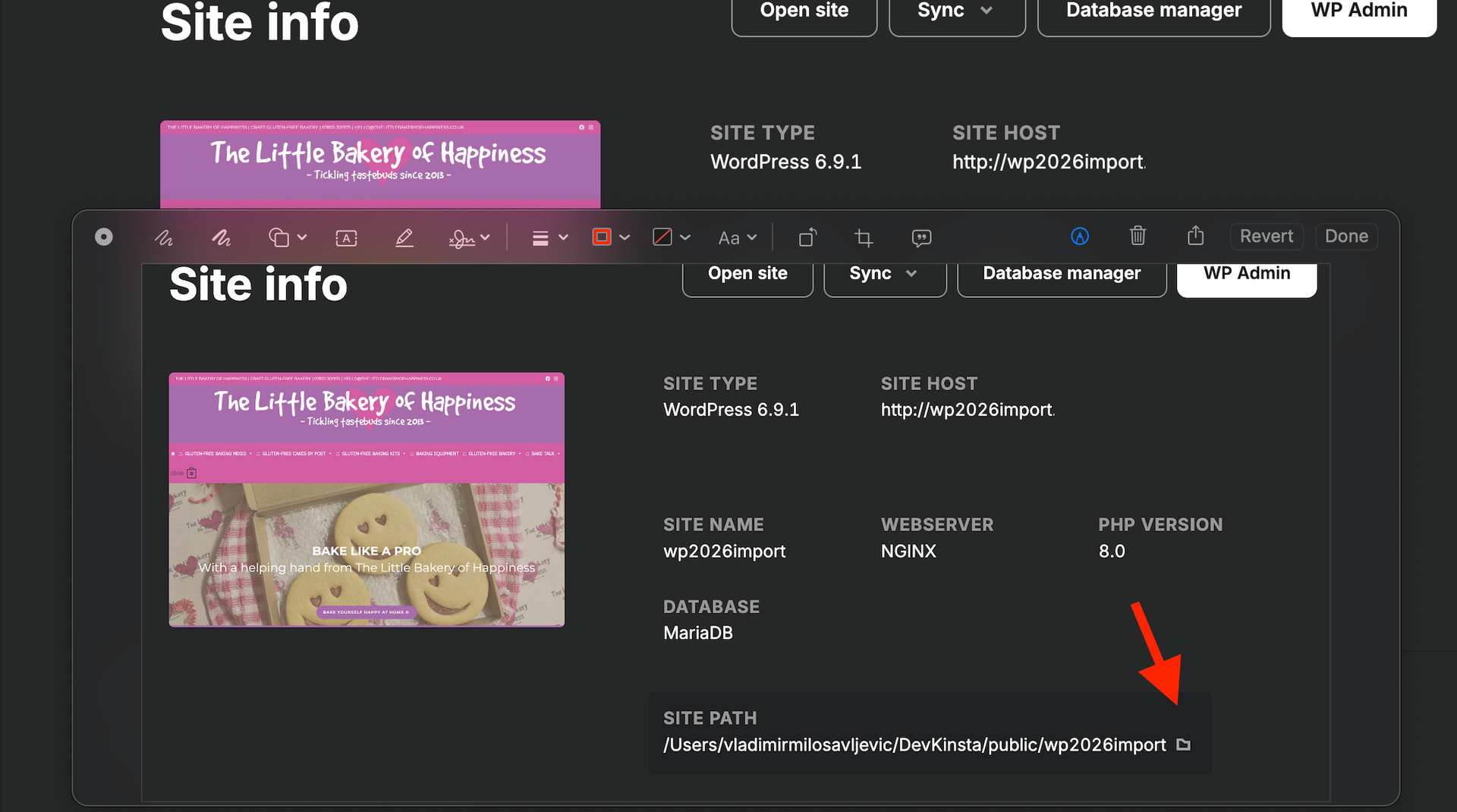
I got your message in regards to critical error on wp-admin. I can’t replicate the issue, the site works on my local so what you can do is regular troubleshooting. Click on ‘site path’ and edit WP Config to enable WP\_DEBUG and it should tell you what the issue is. Add the lines:
define(‘WP\_DEBUG’, true);
define(‘WP\_DEBUG\_DISPLAY,true);
Kind regards 👋
---
### Author:  [@vickypsv](https://community.kinsta.com/u/vickypsv)
#### Post date: [March 10, 2026, 8:25am UTC](https://community.kinsta.com/t/importing-backup-error-dk0081/6028/17 "2026-03-10T08:25:50Z")
Thank you, I will try that. I only see a blank white box where you have my site showing.
---
### Author:  [@VladimirM](https://community.kinsta.com/u/VladimirM)
#### Post date: [March 10, 2026, 9:42am UTC](https://community.kinsta.com/t/importing-backup-error-dk0081/6028/18 "2026-03-10T09:42:54Z")
When you click on SITE HOST (as in my screenshot) to open the site, does it open, regardless of the box being blank?
Did you edit wp-config as suggested and is there any error shown?
Also, what is the PHP version you have set for this site?
Kind regards!
---
### Author:  [@vickypsv](https://community.kinsta.com/u/vickypsv)
#### Post date: [March 10, 2026, 10:00am UTC](https://community.kinsta.com/t/importing-backup-error-dk0081/6028/19 "2026-03-10T10:00:09Z")
Hi Vladimir. No, both the site and the wpadmin pages were blank when I tried to open them.
But your final sentence has solved the problem - I had the wrong version of php selected. It was set to the default of 8.0 but my site is currently 7.4.
Thank you so very much for all your help in getting this sorted for me.!
---
### Author:  [@VladimirM](https://community.kinsta.com/u/VladimirM)
#### Post date: [March 10, 2026, 10:17am UTC](https://community.kinsta.com/t/importing-backup-error-dk0081/6028/20 "2026-03-10T10:17:17Z")
That’s great to hear 🎉 I’m glad we could help.
Let us know if you need anything else. 🙂
Kind regards!