### Author:  [@Physiotutors](https://community.kinsta.com/u/Physiotutors)
#### Post date: [October 15, 2025, 12:32pm UTC](https://community.kinsta.com/t/something-bad-happened-creating-database-step-2/5577/1 "2025-10-15T12:32:00Z")
I fail at pulling a live site from Kinsta into DevKinsta or even creating a new site from scratch
It fails at step 2 (creating the database).
I have freshly installed DevKinsta and Docker with full deinstallation and cleanup of files in the Library and User folder.
here’s my setup and process: [PL2730H — Screen Studio](https://screen.studio/share/tQlVM6Og)
have looked through similar topics but to no avail. Also I see a lot of people posting their main.log file contents however I cannot locate it. My logs folder under user/DevKinsta/logs doesn’t have that file and a full finder search also doesn’t locate it.
any input is welcome
---
### Author:  [@VladimirM](https://community.kinsta.com/u/VladimirM)
#### Post date: [October 15, 2025, 2:08pm UTC](https://community.kinsta.com/t/something-bad-happened-creating-database-step-2/5577/2 "2025-10-15T14:08:51Z")
Hello @Physiotutors 👋 Welcome to the community!
I’m sorry to hear that you’re experiencing this issue.
If you haven’t already, please try the following:
- Quit DevKinsta
- Delete all containers starting with devkinsta\_ from Docker (make sure it’s containers, not Images or Volumes)
- Start DevKinsta again and re-attempt the pull
If that doesn’t work, please try obtaining the log file.
To get the main.log, please click on question mark on the left and then click ‘Reveal Log file in File Manager’

---
### Author:  [@Physiotutors](https://community.kinsta.com/u/Physiotutors)
#### Post date: [October 15, 2025, 2:23pm UTC](https://community.kinsta.com/t/something-bad-happened-creating-database-step-2/5577/3 "2025-10-15T14:23:49Z")
Thanks. I was able to locate the log file. it reads [2025-10-15 16:21:20.116] [error] [ipcMainStep] Error in operation SITE\_CREATION, step database: Error: Error (1): UERROR 1045 (28000): Access denied for user ‘root’@‘localhost’ (using password: YES)
how do I proceed to update the access credentials?
---
### Author:  [@Adrian\_L](https://community.kinsta.com/u/Adrian_L)
#### Post date: [October 15, 2025, 11:26pm UTC](https://community.kinsta.com/t/something-bad-happened-creating-database-step-2/5577/4 "2025-10-15T23:26:47Z")
Hi @Physiotutors
Regarding the specific error “`Access denied for user ‘root’@‘localhost`’,” I recommend checking the below thread for possible solutions. However, the steps can be quite technical, so it might be simpler to start with a fresh installation of DevKinsta. But before you do that, could you please confirm the following information?
**DevKinsta version:
Docker Desktop version:
Computer Operating System version:**
(If you’re using Windows, please confirm if you selected WSL or HyperV during the installation)
> [@Error at creating MySQL](https://community.kinsta.com/t/error-at-creating-mysql/2815/31):
>
> Thank you. Our team dig more through the main.log, it looks like the database (MariaDB) password is successfully reset on each startup. Possible that when trying to authenticate, it still tries with some old password. To continue troubleshooting, you could try to manually login to MariaDB using Docker. To do this: Open Docker Desktop while DevKinsta is running Select devkinsta\_db container and attach a shell to it (see picture below) In the shell, log in with mysql: mysql -u r…
---
### Author:  [@Physiotutors](https://community.kinsta.com/u/Physiotutors)
#### Post date: [October 16, 2025, 7:06am UTC](https://community.kinsta.com/t/something-bad-happened-creating-database-step-2/5577/5 "2025-10-16T07:06:10Z")
Thanks for this. I got to a similar solution with the help of ChatGPT and was able to pull the site. however at the second to last step with
[2025-10-15 21:08:42.111] [error] Error: =[31;1mError:[0m Error establishing a database connection.
```
at file:///Applications/DevKinsta.app/Contents/Resources/app.asar/dist/renderer.prod.js:2:816008
at tryCatch (file:///Applications/DevKinsta.app/Contents/Resources/app.asar/dist/renderer.prod.js:8:1677369)
at Generator. (file:///Applications/DevKinsta.app/Contents/Resources/app.asar/dist/renderer.prod.js:8:1679014)
at Generator.next (file:///Applications/DevKinsta.app/Contents/Resources/app.asar/dist/renderer.prod.js:8:1677918)
at asyncGeneratorStep (file:///Applications/DevKinsta.app/Contents/Resources/app.asar/dist/renderer.prod.js:8:1669659)
at \_next (file:///Applications/DevKinsta.app/Contents/Resources/app.asar/dist/renderer.prod.js:8:1669879)
at process.processTicksAndRejections (node:internal/process/task_queues:95:5)
```
---
### Author:  [@VladimirM](https://community.kinsta.com/u/VladimirM)
#### Post date: [October 16, 2025, 2:08pm UTC](https://community.kinsta.com/t/something-bad-happened-creating-database-step-2/5577/6 "2025-10-16T14:08:20Z")
Hello Physiotutors 👋
You stated you were able to pull the site. Which two steps don’t complete?
Can you please provide the entire main.log here? We’ll remove it from public access after downloading it.
Kind regards!
---
### Author:  [@Seyed](https://community.kinsta.com/u/Seyed)
#### Post date: [November 8, 2025, 6:20pm UTC](https://community.kinsta.com/t/something-bad-happened-creating-database-step-2/5577/7 "2025-11-08T18:20:26Z")
I am facing same issue after recent devKinsta update. I removed devKinsta and Docker completely and tried again . No luck.
I’,m using Mac.
---
### Author:  [@merineth](https://community.kinsta.com/u/merineth)
#### Post date: [November 9, 2025, 1:36am UTC](https://community.kinsta.com/t/something-bad-happened-creating-database-step-2/5577/8 "2025-11-09T01:36:43Z")
Hi @Seyed Welcome to the community! Sorry to hear you’re running into the same issue. We’ve already passed this along to our DevKinsta development team so they can take a closer look.
I also replied to your other posts. If you could share your main.log file, that would really help us dig in and understand what’s going on. Appreciate your patience while we work on this!
---
### Author:  [@Seyed](https://community.kinsta.com/u/Seyed)
#### Post date: [November 9, 2025, 7:18am UTC](https://community.kinsta.com/t/something-bad-happened-creating-database-step-2/5577/9 "2025-11-09T07:18:35Z")
> [@merineth](#):
>
> main.lo
How to get the main log file for you.?
This happened only after recent update to devkinsta.
Also I need clear instruction how to install both devKinsta and Docker so that we can try fresh install. We already lost current development work.
---
### Author:  [@merineth](https://community.kinsta.com/u/merineth)
#### Post date: [November 9, 2025, 8:00am UTC](https://community.kinsta.com/t/something-bad-happened-creating-database-step-2/5577/10 "2025-11-09T08:00:19Z")
Hi @Seyed You can retrieve the **[main.log](https://kinsta.com/knowledgebase/devkinsta/error-codes/#info)** file by clicking on the “Reveal log file in File Manager” under the Help and Support page in DevKinsta.

In addition, can you please share the following details?
**DevKinsta Version:**
**OS Version:**
**Docker Desktop Version:**
You can refer to [this link](https://kinsta.com/docs/devkinsta/devkinsta-getting-started/installation/) for instructions and guide on how to install Docker and DevKinsta.
---
### Author:  [@Seyed](https://community.kinsta.com/u/Seyed)
#### Post date: [November 9, 2025, 1:46pm UTC](https://community.kinsta.com/t/something-bad-happened-creating-database-step-2/5577/11 "2025-11-09T13:46:12Z")
> [@merineth](#):
>
> **DevKinsta Version:**
> **OS Version:**
> **Docker Desktop Version:**
main.log (link removed for data security/privacy)
**DevKinsta Version:** Version 2.13.6 (2.13.6.9096)
**OS Version:** 15.7.2 (24G325) macos sequoia
**Docker Desktop Version:** Version 4.50.0 (209931)
---
### Author:  [@Andrew](https://community.kinsta.com/u/Andrew)
#### Post date: [November 10, 2025, 2:01am UTC](https://community.kinsta.com/t/something-bad-happened-creating-database-step-2/5577/15 "2025-11-10T02:01:49Z")
Hi @Seyed,
Thank you for your reply! We have reviewed the main.log file you shared and we notice that during the site creation process it appears the connection to the database service is being denied. This can indicate that for some reason the root user password is out of sync, or not set.
A fellow DevKinsta user shared a solution that worked for them. Their instructions go through the process of resetting the root password of the database container. You may find a link to their instructions below:
> [@Something bad happened: in create new site](https://community.kinsta.com/t/something-bad-happened-in-create-new-site/2190/17):
>
> I know I am a bit late to the party, but just in case someone else is having trouble with this specific problem the following might be a solution: In my case the root password wasn’t set, so I just had to set it manually in docker. The following steps is how I fixed it. Open docker desktop and navigate to “Containers” Open the devkinsta\_db container Navigate to the inspect tab Find the Config section Copy the root password under the config section; it should something like this: "Config": { …
Please let us know if resetting the database’s root user password helps resolve the issue, and allows the site creation process to complete.
If you do have any questions please let us know! We look forward to hearing from you!
---
### Author:  [@Seyed](https://community.kinsta.com/u/Seyed)
#### Post date: [November 10, 2025, 8:13am UTC](https://community.kinsta.com/t/something-bad-happened-creating-database-step-2/5577/16 "2025-11-10T08:13:08Z")
This resolves the mariadb error. Now the new wordpress sites not creating successfully.
only the wordpress installation files are added the public folder.
wp-admin/setup-config.php
---
### Author:  [@VladimirM](https://community.kinsta.com/u/VladimirM)
#### Post date: [November 10, 2025, 8:16am UTC](https://community.kinsta.com/t/something-bad-happened-creating-database-step-2/5577/17 "2025-11-10T08:16:39Z")
Thank you for writing back! 👋
You will need to grant permissions to the root user to have access from any host.
Please execute the following commands from the Terminal one by one:
1. docker exec -it devkinsta\_db bash
2. mysql -u root -p
(enter the password you created)
3. GRANT ALL PRIVILEGES ON \*.\* TO ‘root’@‘%’ IDENTIFIED BY ‘the password you created’ WITH GRANT OPTION;
4. exit
5. exit
Let me know if that resolves the error, if not, you might need to manually update config.json, and I’ll give you the steps.
---
### Author:  [@Seyed](https://community.kinsta.com/u/Seyed)
#### Post date: [November 10, 2025, 10:26am UTC](https://community.kinsta.com/t/something-bad-happened-creating-database-step-2/5577/18 "2025-11-10T10:26:03Z")
Previous step atleast created the site but not installed wordpress.
After following the new steps you sent, we got the same issue, struck in step 2 creating DB.
---
### Author:  [@VladimirM](https://community.kinsta.com/u/VladimirM)
#### Post date: [November 10, 2025, 10:30am UTC](https://community.kinsta.com/t/something-bad-happened-creating-database-step-2/5577/19 "2025-11-10T10:30:03Z")
Thanks for writing back!
Part three - \*\*UPDATING DevKinsta config.json
\*\*
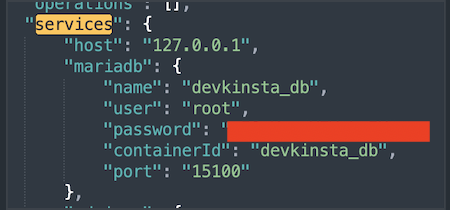
If you completed both sets of steps above and there was no change and the issue persists, you will need to check the password in config.json file.
Go to Finder → Go → Library → Application Support → DevKinsta. (If you don’t have ‘Library’ in Go (top bar), go to Finder, control-click anywhere in the directory and in Show View Options select “Show Library Folder”)
Once you are in DevKinsta directory, find config.json. Open it in any text editor that has ‘search’ feature. Search for ‘services’ and you should see a code like this:
[](https://us1.discourse-cdn.com/flex020/uploads/kinsta/original/2X/9/9ac492ca4d8edc7486444da8992350768e148078.png "image")
[image450×210 41 KB](https://us1.discourse-cdn.com/flex020/uploads/kinsta/original/2X/9/9ac492ca4d8edc7486444da8992350768e148078.png "image")
Update that to a password that you have set when you performend previous steps.
---
### Author:  [@RogerBreton](https://community.kinsta.com/u/RogerBreton)
#### Post date: [April 11, 2026, 12:20pm UTC](https://community.kinsta.com/t/something-bad-happened-creating-database-step-2/5577/20 "2026-04-11T12:20:35Z")
This issue usually happens when DevKinsta cannot properly create or connect the MySQL database during setup. Since you already reinstalled DevKinsta and Docker, the most common fix is to fully remove all existing DevKinsta Docker containers (including stopped ones), then restart Docker and try again. Also make sure Docker has enough resources (CPU/RAM) allocated and is running in a healthy state…… If the problem continues, check Docker logs because missing or corrupted containers are often the cause of the “Step 2 database creation” failure……
---
### Author:  [@Steve88](https://community.kinsta.com/u/Steve88)
#### Post date: [May 8, 2026, 4:42am UTC](https://community.kinsta.com/t/something-bad-happened-creating-database-step-2/5577/21 "2026-05-08T04:42:46Z")
Nice explanation sir..
The part about removing old/stopped Docker containers is especially helpful, that step gets overlooked a lot[.](https://tubidy.yt/) Hopefully this helps others fix the database creation issue faster 🙌