have looked through similar topics but to no avail. Also I see a lot of people posting their main.log file contents however I cannot locate it. My logs folder under user/DevKinsta/logs doesn’t have that file and a full finder search also doesn’t locate it.
Thanks. I was able to locate the log file. it reads [2025-10-15 16:21:20.116] [error] [ipcMainStep] Error in operation SITE_CREATION, step database: Error: Error (1): UERROR 1045 (28000): Access denied for user ‘root’@‘localhost’ (using password: YES)
how do I proceed to update the access credentials?
Regarding the specific error “Access denied for user ‘root’@‘localhost’,” I recommend checking the below thread for possible solutions. However, the steps can be quite technical, so it might be simpler to start with a fresh installation of DevKinsta. But before you do that, could you please confirm the following information?
DevKinsta version:
Docker Desktop version:
Computer Operating System version:
(If you’re using Windows, please confirm if you selected WSL or HyperV during the installation)
Thanks for this. I got to a similar solution with the help of ChatGPT and was able to pull the site. however at the second to last step with
[2025-10-15 21:08:42.111] [error] Error: =[31;1mError:[0m Error establishing a database connection.
at file:///Applications/DevKinsta.app/Contents/Resources/app.asar/dist/renderer.prod.js:2:816008

at tryCatch (file:///Applications/DevKinsta.app/Contents/Resources/app.asar/dist/renderer.prod.js:8:1677369)

at Generator.<anonymous> (file:///Applications/DevKinsta.app/Contents/Resources/app.asar/dist/renderer.prod.js:8:1679014)

at Generator.next (file:///Applications/DevKinsta.app/Contents/Resources/app.asar/dist/renderer.prod.js:8:1677918)

at asyncGeneratorStep (file:///Applications/DevKinsta.app/Contents/Resources/app.asar/dist/renderer.prod.js:8:1669659)

at \_next (file:///Applications/DevKinsta.app/Contents/Resources/app.asar/dist/renderer.prod.js:8:1669879)

at process.processTicksAndRejections (node:internal/process/task_queues:95:5)
Hi @Seyed Welcome to the community! Sorry to hear you’re running into the same issue. We’ve already passed this along to our DevKinsta development team so they can take a closer look.
I also replied to your other posts. If you could share your main.log file, that would really help us dig in and understand what’s going on. Appreciate your patience while we work on this!
Thank you for your reply! We have reviewed the main.log file you shared and we notice that during the site creation process it appears the connection to the database service is being denied. This can indicate that for some reason the root user password is out of sync, or not set.
A fellow DevKinsta user shared a solution that worked for them. Their instructions go through the process of resetting the root password of the database container. You may find a link to their instructions below:
Please let us know if resetting the database’s root user password helps resolve the issue, and allows the site creation process to complete.
If you do have any questions please let us know! We look forward to hearing from you!
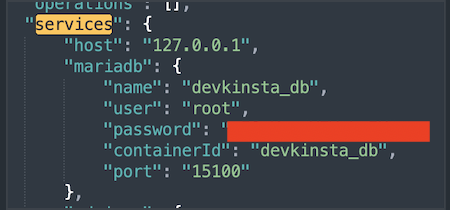
If you completed both sets of steps above and there was no change and the issue persists, you will need to check the password in config.json file.
Go to Finder → Go → Library → Application Support → DevKinsta. (If you don’t have ‘Library’ in Go (top bar), go to Finder, control-click anywhere in the directory and in Show View Options select “Show Library Folder”)
Once you are in DevKinsta directory, find config.json. Open it in any text editor that has ‘search’ feature. Search for ‘services’ and you should see a code like this:
This issue usually happens when DevKinsta cannot properly create or connect the MySQL database during setup. Since you already reinstalled DevKinsta and Docker, the most common fix is to fully remove all existing DevKinsta Docker containers (including stopped ones), then restart Docker and try again. Also make sure Docker has enough resources (CPU/RAM) allocated and is running in a healthy state…… If the problem continues, check Docker logs because missing or corrupted containers are often the cause of the “Step 2 database creation” failure……
Nice explanation sir..
The part about removing old/stopped Docker containers is especially helpful, that step gets overlooked a lot. Hopefully this helps others fix the database creation issue faster
 Welcome to the community!