We’ve added support for creating NS records for subdomains in Kinsta DNS.
This new feature lets you delegate DNS management for specific subdomains to another DNS provider or even to a separate DNS zone within MyKinsta, while keeping your root domain records managed in one place.
How it works
To create an NS record, head to the DNS section of MyKinsta from the left sidebar and choose the domain you want to manage.
Accessing DNS management section in the MyKinsta dashboard.
On the DNS management page, you’ll see your existing records and the option to add new ones by clicking the Add a DNS record button.
DNS records overview in MyKinsta.
Choose NS from the record type tab. From there, you can enter the subdomain you want to delegate, add the authoritative nameservers, and set your preferred TTL.
For example, in the screenshot below, we delegate shop.happyavocados.com to Cloudflare:
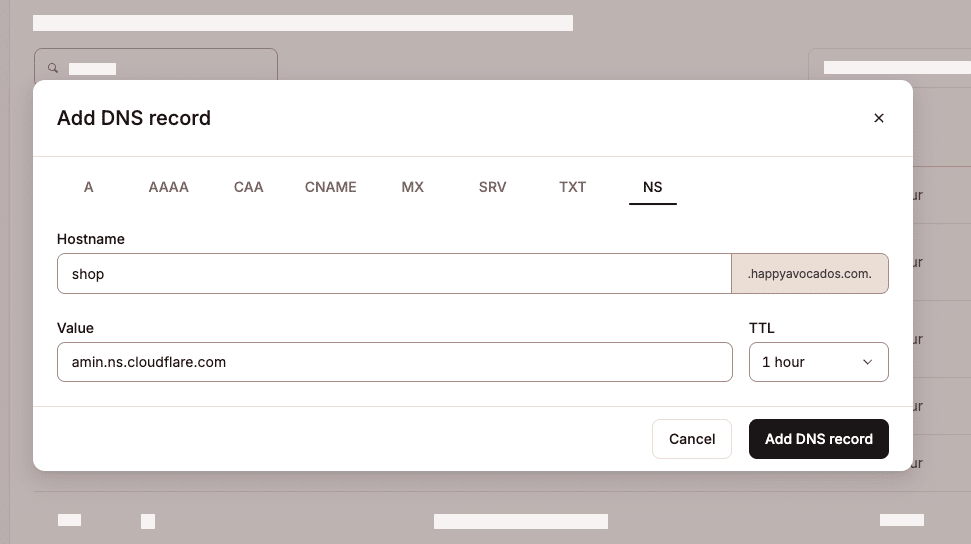
This setup allows Cloudflare to manage all DNS records under shop.happyavocados.com, while the root domain and other subdomains remain in Kinsta DNS.
Reliable hosting, simpler management
At Kinsta, we’re always working to improve your hosting experience and make it easier to manage. The addition of NS records for subdomains is one more way we’re giving you the flexibility to run complex projects without the complexity.
If you’re not already a Kinsta customer and want powerful hosting with built-in DNS management, explore our plans to see how Kinsta can help you manage everything in one place.
The post Subdomain delegation with NS records now available in Kinsta DNS appeared first on Kinsta®.
This is a companion discussion topic for the original entry at https://kinsta.com/changelog/subdomain-delegation-with-ns-records/